Templates · Booking and checkout screens · Lifestyle app · Arcade
Arcade Checkout screen
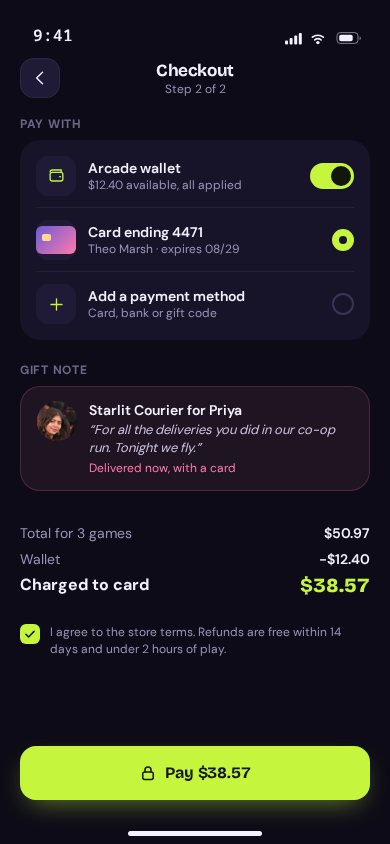
A checkout screen from Arcade, a lifestyle app template in a Dark-first style. Screen 11 of 25.
Arcade is a complete game store companion: welcome and sign in, a store front with an autumn sale, search, a game page with screenshots, reviews and system requirements, a wishlist, cart, checkout and purchase, a library with play time, a game hub, achievements, remote install to a home PC with a live download, play stats, friends, chat with a co-op invite, writing a review, notifications, an Arcade Pass plan, profile and settings. Ink violet with acid lime, pink and sky.
| Detail | Value |
|---|---|
| Screen type | Checkout |
| App | Arcade: Game store, library and friends |
| Category | Lifestyle |
| Design language | Dark-first, dark |
| Type | Bricolage Grotesque for headings, DM Sans for text |
| Colours | #0d0b17 background, #17142a surface, #f4f1ff text, #9a94b8 text-muted, #c5f53c accent, #13160a accent-contrast, #ff7aa8 secondary, #2a2542 border, #ff5d6c danger |
What this screen says
- Checkout
- Step 2 of 2
- Pay with
- Arcade wallet$12.40 available, all applied
- Card ending 4471Theo Marsh · expires 08/29
- Add a payment methodCard, bank or gift code
- Gift note
- Starlit Courier for Priya
- “For all the deliveries you did in our co-op run. Tonight we fly.”
- Delivered now, with a card
- Total for 3 games $50.97
- Wallet −$12.40
- Charged to card $38.57
- I agree to the store terms. Refunds are free within 14 days and under 2 hours of play.
- Pay $38.57
Around it in Arcade
More booking and checkout screens
- Vow Book a visit: Wedding planner
- Byline Payment: Daily news reader
- Marquee Pick seats: Cinema tickets and watchlist
- Handy Schedule: Home services
- Tasker Schedule: Book and do local odd jobs
- Toolbox Cart: Hardware store and project lists
- Kibble Cart: Pet supplies and autoship
- Guardrail Bonus time: Parental controls and screen time
- Collar Checkout: GPS pet tracker
- Postage Service: Send parcels and find drop-off points
- Specs Bag: Glasses with virtual try-on
- Circuit Cart: Electronics store with trade-in and repairs
Every lifestyle app checkout screen
What makes a good checkout screen
- Show the total early and honestly. Taxes, delivery and service fees should appear before the last step. A higher total on the final screen feels like a trick.
- Offer wallet payments. Apple Pay and Google Pay skip card typing entirely. Show them first when they are available.
- Ask for the minimum. Only the fields needed to deliver or book. Save details for next time.
- Let people review before paying. A clear summary of items, dates, address and price, with each part editable without starting over.
The full checkout screen guide and every example
Remix Arcade free: describe your own app and it is drawn in this design. Or get its files from $10: Figma, React Native, SwiftUI, Flutter and HTML.