Templates · Booking and checkout screens · Lifestyle app · Kibble
Kibble Cart screen
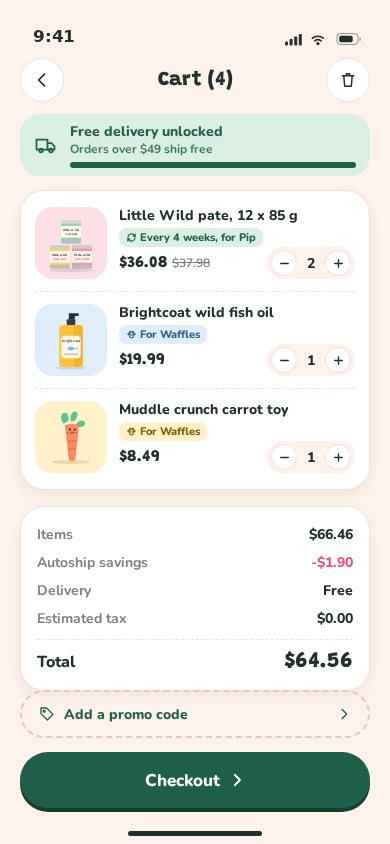
A checkout screen from Kibble, a pet supplies and autoship app template in a Playful style. Screen 9 of 25.
Kibble is a complete pet supplies app: welcome and pet setup, sign in, a home that knows when the food runs out, shop by pet, search with filters, a product page with sizes and autoship savings, reviews, cart, checkout and confirmation, live delivery tracking, orders, autoship schedules and edits, pet profiles with weight and diet, a pharmacy with refill requests, a vet chat, a spend dashboard, a membership plan, notifications, account and settings. Blush cream and white with deep pine green, bubblegum pink and butter yellow.
| Detail | Value |
|---|---|
| Screen type | Checkout |
| App | Kibble: Pet supplies and autoship |
| Category | Lifestyle |
| Design language | Playful, light |
| Type | Grandstander for headings, Nunito for text |
| Colours | #fdf2ec background, #ffffff surface, #22302b text, #7d817a text-muted, #1f5f4a primary, #143f31 primary-ledge, #ff8fab accent, #e8557e accent-strong, #ffd166 highlight, #dcefe4 mint-tint, #ffe0e6 pink-tint, #fff1c9 butter-tint, #dfeefa sky-tint, #f1e1d8 border |
What this screen says
- Cart (4)
- Free delivery unlockedOrders over $49 ship free
- Little Wild pate, 12 x 85 g Every 4 weeks, for Pip
- Brightcoat wild fish oil For Waffles
- Muddle crunch carrot toy For Waffles
- Items$66.46
- Autoship savings-$1.90
- DeliveryFree
- Estimated tax$0.00
- Total$64.56
- Add a promo code
- Checkout
Around it in Kibble
More booking and checkout screens
- Handy Schedule: Home services
- Tasker Schedule: Book and do local odd jobs
- Toolbox Cart: Hardware store and project lists
- Guardrail Bonus time: Parental controls and screen time
- Collar Checkout: GPS pet tracker
- Postage Service: Send parcels and find drop-off points
- Specs Bag: Glasses with virtual try-on
- Circuit Cart: Electronics store with trade-in and repairs
- Provenance Bag: Authenticated luxury resale
- Gavel Checkout: Live online auctions
- Tidy Pick a time: Book home cleaners
- Dorm Pay deposit: Find student housing
Every lifestyle app checkout screen
What makes a good checkout screen
- Show the total early and honestly. Taxes, delivery and service fees should appear before the last step. A higher total on the final screen feels like a trick.
- Offer wallet payments. Apple Pay and Google Pay skip card typing entirely. Show them first when they are available.
- Ask for the minimum. Only the fields needed to deliver or book. Save details for next time.
- Let people review before paying. A clear summary of items, dates, address and price, with each part editable without starting over.
The full checkout screen guide and every example
Remix Kibble free: describe your own app and it is drawn in this design. Or get its files from $10: Figma, React Native, SwiftUI, Flutter and HTML.