Templates · Form and input screens · Lifestyle app · Annex
Annex Style screen
A form screen from Annex, an AI interior redesign app template in a Minimal style. Screen 7 of 25.
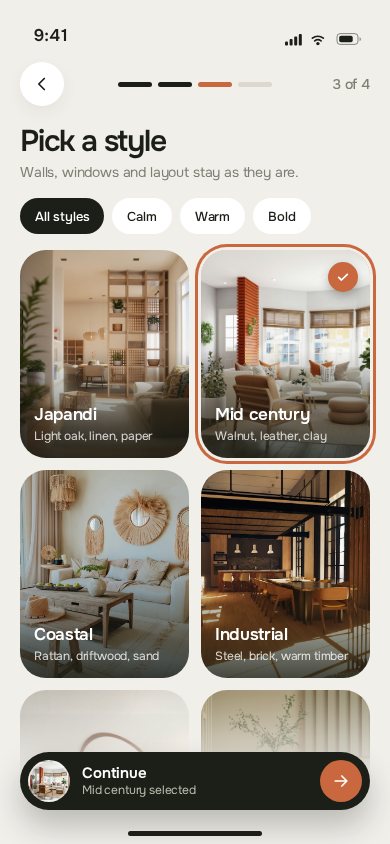
Annex is a complete AI interior redesign app: onboarding, sign in, a home with the room in progress, a four step flow from the photo to room type, style, palette and budget, a generating screen, four results, a before and after you can drag, refine with a prompt, erase and replace, shop the look with numbered items, a moodboard, projects, a community feed, saved designs, credits, a paywall, profile and settings. Warm stone and white with olive black and clay.
| Detail | Value |
|---|---|
| Screen type | Form |
| App | Annex: AI interior redesign |
| Category | Lifestyle |
| Design language | Minimal, light |
| Type | Onest |
| Colours | #f1efea background, #ffffff surface, #1c1f18 text, #7d7f73 text-muted, #c9683f accent, #ffffff accent-contrast, #5d6b4c secondary, #e3e0d8 border, #b8452f danger |
What this screen says
- 3 of 4
- Pick a style
- Walls, windows and layout stay as they are.
- All styles Calm Warm Bold
- Japandi
- Light oak, linen, paper
- Mid century
- Walnut, leather, clay
- Coastal
- Rattan, driftwood, sand
- Industrial
- Steel, brick, warm timber
- Scandinavian
- Pale wood, wool, grey
- Warm minimal
- Plaster, boucle, stone
- ContinueMid century selected
Around it in Annex
More form and input screens
- Provenance Make an offer: Authenticated luxury resale
- Gavel Max bid: Live online auctions
- Tidy Your home: Book home cleaners
- Dorm Filters: Find student housing
- Hem Alteration: Tailoring and alterations, collected
- Lendly Return: Borrow things from neighbours
- Stub Transfer: Fan to fan ticket resale
- Trove Save: Visual ideas and boards
- Vidi Details: Video platform for creators
- Roll New album: Photo library and backups
- Splice Speed: Video editor for short clips
- Blush Filters: Beauty and makeup shopping
Every lifestyle app form screen
What makes a good form screen
- Ask only what you need. Every field is a reason to stop. Remove optional fields or move them to later.
- Labels above fields. Visible labels stay readable while people type; placeholder-only labels disappear.
- Use the right keyboard and input. Number pads for amounts, email keyboards for email, pickers for dates and autofill for addresses and codes.
- Validate as people go. Show problems next to the field when people leave it, in words that say how to fix them.
The full form screen guide and every example
Remix Annex free: describe your own app and it is drawn in this design. Or get its files from $10: Figma, React Native, SwiftUI, Flutter and HTML.