Templates · List and feed screens · Smart home app · Abode
Abode Scenes screen
A list screen from Abode, a smart home devices app template in a Minimal style. Screen 18 of 25.
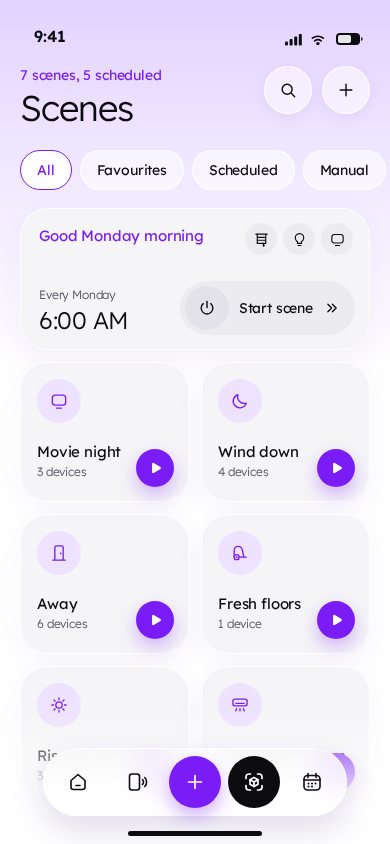
Abode is a complete smart home app centred on devices: welcome, sign in and a code, a home with the weather, what is playing, quick access and favourite scenes, every device by room, detailed controls for the air conditioner, TV, speaker, robot vacuum, lights and blinds, timers, pairing a new device, scenes you can build and run, a weekly schedule, energy use, a plan, profile and settings. White and pale grey with a lilac wash, electric violet and black.
| Detail | Value |
|---|---|
| Screen type | List |
| App | Abode: Smart home devices |
| Category | Smart home |
| Design language | Minimal, light |
| Type | Lexend |
| Colours | #ffffff background, #f5f5f7 surface, #0c0c10 text, #74747f text-muted, #7a1cf5 accent, #ffffff accent-contrast, #ece2ff secondary, #e9e9ee border, #e5484d danger |
What this screen says
- 7 scenes, 5 scheduled
- Scenes
- All Favourites Scheduled Manual
- Good Monday morning
- Every Monday
- 6:00 AM
- Start scene
- Movie night
- 3 devices
- Wind down
- 4 devices
- Away
- 6 devices
- Fresh floors
- 1 device
- Rise and shine
- Cool the bedroom
Around it in Abode
More list and feed screens
- Kelvin Rooms: Climate and thermostat
- Glow Rooms: Light scenes and colour
- Tagged Rooms: Home inventory for insurance
- Lobby Packages: Apartment building app
- Sweep Rooms: Robot vacuum and mop
- Dusk Notifications: Smart home scenarios
- Lumen Notifications: Smart home energy
- Boxed Inventory: Book movers and plan moving day
- Meter Readings: Your energy supplier account
- Couch Episodes: TV remote, casting and watchlist
- Chime Devices: Voice assistant and smart speaker
- Latch Doors: Smart locks and guest access
Every smart home app list screen
What makes a good list screen
- Show what people need to decide. Each row should carry just enough to choose: a title, one or two details and a status. Everything else belongs on the detail screen.
- Keep rows consistent. The same information in the same place on every row lets people scan down a column instead of reading each item.
- Group with headings. Dates, categories or status headings break long lists into chunks people can skip through.
- Make common actions quick. Swipe actions, a checkbox or a heart on the row save opening the item for small tasks.
The full list screen guide and every example
Remix Abode free: describe your own app and it is drawn in this design. Or get its files from $10: Figma, React Native, SwiftUI, Flutter and HTML.