Templates · List and feed screens · Smart home app · Sweep
Sweep Rooms screen
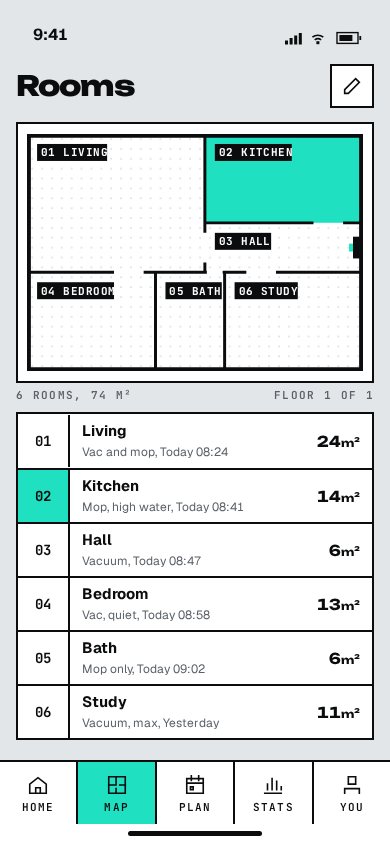
A list screen from Sweep, a robot vacuum and mop app template in a Brutalist style. Screen 7 of 25.
Sweep is a complete robot vacuum and mop app: welcome, pairing, sign in and first mapping, a home with the last clean on the floor plan, a live clean with the path filling in room by room, rooms, room settings, map editing with no-go zones and virtual walls, a custom clean, schedules, a clean report with dirt hotspots, history, stats, a live robot camera, avoided obstacles, the self-emptying dock, consumables care with a reorder cart, notifications, a Plus plan, profile and settings. Concrete grey, black and electric aqua.
| Detail | Value |
|---|---|
| Screen type | List |
| App | Sweep: Robot vacuum and mop |
| Category | Smart home |
| Design language | Brutalist, light |
| Type | Unbounded for headings, Geist for text |
| Colours | #e3e6e8 background, #ffffff surface, #0b0c0d text, #5b6168 text-muted, #1fe0c0 accent, #0b0c0d accent-contrast, #c9ced2 secondary, #0b0c0d border, #ff5a36 danger |
What this screen says
- Rooms
- 6 rooms, 74 m² Floor 1 of 1
- LivingVac and mop, Today 08:24
- 24m²
- KitchenMop, high water, Today 08:41
- 14m²
- HallVacuum, Today 08:47
- 6m²
- BedroomVac, quiet, Today 08:58
- 13m²
- BathMop only, Today 09:02
- StudyVacuum, max, Yesterday
- 11m²
- Home
- Map
- Plan
- Stats
- You
Around it in Sweep
More list and feed screens
- Mesh Devices: Home Wi-Fi network
- Decibel Queue: Multi-room speakers
- Nursery Lullabies: Baby monitor camera and sleep
- Porch Cameras: Home security cameras
- Sundial Roof: Solar panels and home battery
- Puddle Zones: Garden watering and sprinklers
- Upkeep Calendar: Home maintenance calendar
- Kelvin Rooms: Climate and thermostat
- Glow Rooms: Light scenes and colour
- Tagged Rooms: Home inventory for insurance
- Lobby Packages: Apartment building app
- Dusk Notifications: Smart home scenarios
Every smart home app list screen
What makes a good list screen
- Show what people need to decide. Each row should carry just enough to choose: a title, one or two details and a status. Everything else belongs on the detail screen.
- Keep rows consistent. The same information in the same place on every row lets people scan down a column instead of reading each item.
- Group with headings. Dates, categories or status headings break long lists into chunks people can skip through.
- Make common actions quick. Swipe actions, a checkbox or a heart on the row save opening the item for small tasks.
The full list screen guide and every example
Remix Sweep free: describe your own app and it is drawn in this design. Or get its files from $10: Figma, React Native, SwiftUI, Flutter and HTML.