Templates · Profile screens · Finance app · Zentra
Zentra Profile screen
A profile screen from Zentra, a crypto trading app template in a Dark-first style. Screen 13 of 14.
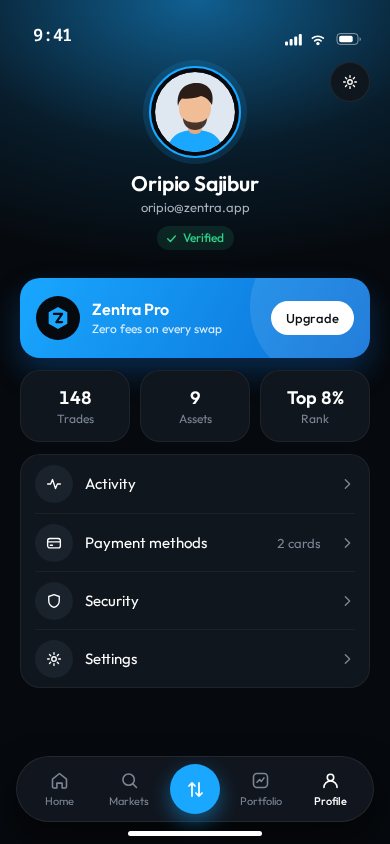
Zentra is a complete crypto app on near-black: onboarding, sign in, passcode, a balance home with a watchlist, markets, a coin chart, swap with a keypad, a receipt, portfolio, deposit, activity, a Pro paywall, profile and settings. One electric blue for every action, green and red only for price moves.
| Detail | Value |
|---|---|
| Screen type | Profile |
| App | Zentra: Crypto trading |
| Category | Finance |
| Design language | Dark-first, dark |
| Type | Outfit |
| Colours | #06090d background, #10161d surface, #ffffff text, #8a94a3 text-muted, #19a7ff accent, #ffffff accent-contrast, #1c242d border, #2fd08a success, #ff5d6c danger |
What this screen says
- Oripio Sajibur
- oripio@zentra.app
- Verified
- Zentra ProZero fees on every swap
- Upgrade
- 148Trades
- 9Assets
- Top 8%Rank
- Activity
- Payment methods 2 cards
- Security
- Settings
- Home
- Markets
- Portfolio
- Profile
Around it in Zentra
More profile screens
- Compound Profile: Mutual funds and SIPs
- Halden Profile: Premium neobank
- Billable Profile: Time tracking and invoices, kept like a ledger
- Lease Profile: Your tenancy, drawn to plan
- Claim Profile: Expenses, filed like a till receipt
- Tally Profile: Monthly budgeting
- Divvy Friend: Split bills with friends
- Ticker Account: Stock investing
- Burrow Profile: Shared savings pots
- Remit Profile: International money transfer
- Piggy Profile: Pocket money for kids
- Settle Profile: Bill payments and banking
Every finance app profile screen
What makes a good profile screen
- Lead with identity. Photo, name and one line about the person at the top. It confirms whose profile this is.
- Show meaningful stats. Two to four numbers that matter in this app, like workouts, followers, books read or streak.
- Make editing obvious for the owner. An Edit profile button near the top, shown only on your own profile.
- Organise content with tabs. Posts, activity, saved or achievements as tabs keep a long profile tidy.
The full profile screen guide and every example
Remix Zentra free: describe your own app and it is drawn in this design. Or get its files from $10: Figma, React Native, SwiftUI, Flutter and HTML.