Templates · Profile screens · Finance app · Claim
Claim Profile screen
A profile screen from Claim, a finance app template in a Minimal style. Screen 24 of 25.
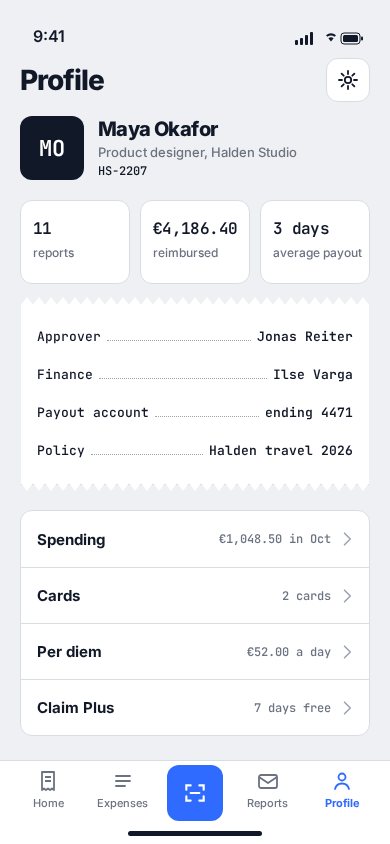
Claim is claim covers expenses end to end: scan a receipt, categorise it, log mileage and per diems, gather everything into a report, submit it and follow the reimbursement from draft to paid. It also has search, spending stats, cards, notifications, a Claim Plus plan, profile and settings.
| Detail | Value |
|---|---|
| Screen type | Profile |
| App | Claim: Expenses, filed like a till receipt |
| Category | Finance |
| Design language | Minimal, light |
| Type | Inter |
| Colours | #eef0f3 background, #ffffff surface, #111827 text, #6b7280 text-muted, #2f6bff accent, #ffffff accent-contrast, #12a150 secondary, #d9dde3 border, #d92d20 danger |
What this screen says
- Profile
- MO
- Maya OkaforProduct designer, Halden Studio HS-2207
- 11reports
- €4,186.40reimbursed
- 3 daysaverage payout
- Approver Jonas Reiter
- Finance Ilse Varga
- Payout account ending 4471
- Policy Halden travel 2026
- Spending€1,048.50 in Oct
- Cards2 cards
- Per diem€52.00 a day
- Claim Plus7 days free
- Home
- Expenses
- Reports
Around it in Claim
More profile screens
- Bullion Profile: Gold and silver savings
- Wage Profile: Get paid as you work
- Keystone Profile: Mortgage and home loan tracker
- Rebate Profile: Cashback card and rewards
- Aegis Profile: Insurance policies and claims
- Till Shop: Card reader and sales for small shops
- Strike Profile: Options trading
- Prism Profile: Net worth across every account
- Folio Account: Stocks and ETF investing
- Compound Profile: Mutual funds and SIPs
- Halden Profile: Premium neobank
- Billable Profile: Time tracking and invoices, kept like a ledger
Every finance app profile screen
What makes a good profile screen
- Lead with identity. Photo, name and one line about the person at the top. It confirms whose profile this is.
- Show meaningful stats. Two to four numbers that matter in this app, like workouts, followers, books read or streak.
- Make editing obvious for the owner. An Edit profile button near the top, shown only on your own profile.
- Organise content with tabs. Posts, activity, saved or achievements as tabs keep a long profile tidy.
The full profile screen guide and every example
Remix Claim free: describe your own app and it is drawn in this design. Or get its files from $10: Figma, React Native, SwiftUI, Flutter and HTML.