Templates · List and feed screens · Education app · Wren
Wren Notifications screen
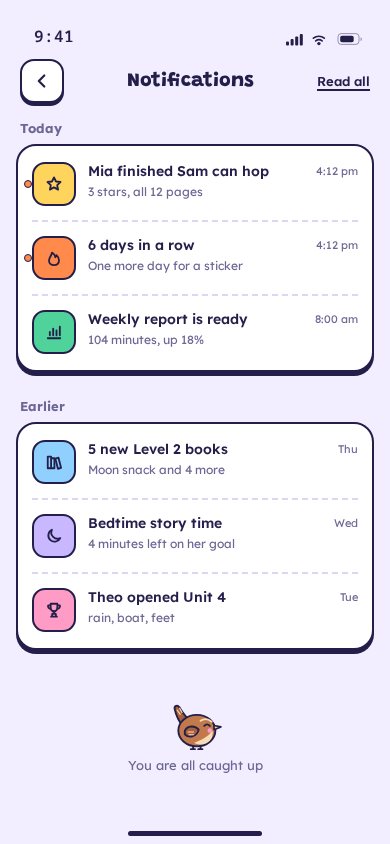
A list screen from Wren, an early reading for kids app template in a Neubrutalism style. Screen 23 of 25.
Wren is a complete early reading app for kids and their grown-ups: welcome, adding a reader, a reading level check, parent sign up and a grown-ups gate, a home with a winding reading trail, a library of picture books, book details, a read-along page with the spoken word lit up, sounding out a word in letter blocks, phonics units, a sound lesson, letter tracing, a picture quiz, a finished book with stars and a sticker, a sticker book, reading aloud to Pip, a progress dashboard, a weekly report, a reading goal, Wren Plus with checkout, notifications, a reader profile and settings. Lilac paper and deep indigo ink with tangerine, mint, sunshine, sky and bubblegum blocks.
| Detail | Value |
|---|---|
| Screen type | List |
| App | Wren: Early reading for kids |
| Category | Education |
| Design language | Neubrutalism, light |
| Type | Grandstander for headings, Lexend for text |
| Colours | #f3eeff background, #ffffff surface, #241f4a text, #6c6794 text-muted, #ff8a4c accent, #241f4a accent-contrast, #4fd39b secondary, #241f4a border, #ff5d6c danger |
What this screen says
- Notifications
- Read all
- Today
- Mia finished Sam can hop3 stars, all 12 pages
- 4:12 pm
- 6 days in a rowOne more day for a sticker
- Weekly report is ready104 minutes, up 18%
- 8:00 am
- Earlier
- 5 new Level 2 booksMoon snack and 4 more
- Thu
- Bedtime story time4 minutes left on her goal
- Wed
- Theo opened Unit 4rain, boat, feet
- Tue
- You are all caught up
Around it in Wren
More list and feed screens
- Zenith Planets: Night sky guide
- Chalk Category: Design courses
- Encore Notifications: Creator courses
- Classroom Classwork: Class stream and assignments
- Studyhall Assigned: Free lessons and practice for school
- Tutor Reviews: Book online tutors for any skill
- Leaf Library: E-books and reading
- Almanac Contents: The free encyclopedia reader
- Tiles Archive: Daily word and number puzzles
- Stacks Loans: Borrow e-books and audiobooks from your library
- Penpal Chats: Language exchange chat
- Lexis In the wild: A word a day
Every education app list screen
What makes a good list screen
- Show what people need to decide. Each row should carry just enough to choose: a title, one or two details and a status. Everything else belongs on the detail screen.
- Keep rows consistent. The same information in the same place on every row lets people scan down a column instead of reading each item.
- Group with headings. Dates, categories or status headings break long lists into chunks people can skip through.
- Make common actions quick. Swipe actions, a checkbox or a heart on the row save opening the item for small tasks.
The full list screen guide and every example
Remix Wren free: describe your own app and it is drawn in this design. Or get its files from $10: Figma, React Native, SwiftUI, Flutter and HTML.