Templates · Settings screens · Sports app · Whistle
Whistle Settings screen
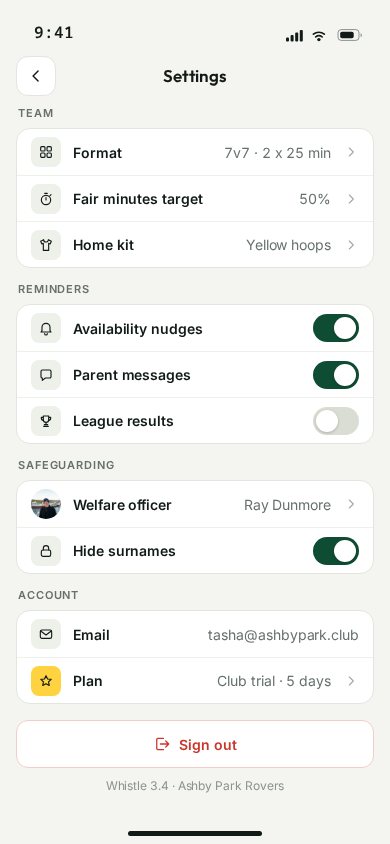
A settings screen from Whistle, a grassroots league manager for coaches app template in an Enterprise style. Screen 25 of 25.
Whistle is a complete team manager for a junior football coach: welcome, team setup and sign in, a match day home, fixtures, a match page, player availability, a drag and drop team sheet on a chalk pitch, a live match with a fair minutes tracker, goal logging and a full time report, the league table and team stats, the squad, a player, adding a player, a training plan, finding and booking a pitch, subs collection, notifications, a club plan, the coach profile and settings. Chalk white and mown turf green with kit yellow and shield crests.
| Detail | Value |
|---|---|
| Screen type | Settings |
| App | Whistle: Grassroots league manager for coaches |
| Category | Sports |
| Design language | Enterprise, light |
| Type | Outfit for headings, Inter for text |
| Colours | #f4f5f0 background, #ffffff surface, #111a16 text, #67716b text-muted, #0e4d34 accent, #ffffff accent-contrast, #ffd23f secondary, #e3e6de border, #c9372c danger |
What this screen says
- Settings
- Team
- Format 7v7 · 2 x 25 min
- Fair minutes target 50%
- Home kit Yellow hoops
- Reminders
- Availability nudges
- Parent messages
- League results
- Safeguarding
- Welfare officer Ray Dunmore
- Hide surnames
- Account
- Email tasha@ashbypark.club
- Plan Club trial · 5 days
- Sign out
- Whistle 3.4 · Ashby Park Rovers
Around it in Whistle
More settings screens
- Angler Settings: A fishing log drawn on the depth chart
- Piste Settings: Ski resort companion
- Crag Settings: Climbing gym logbook
- Fairway Settings: Golf course guide and scorecard
- Matchday Settings: Football scores and fantasy
- Rally Settings: Tennis and padel club
- Swell Settings: Surf forecast
- Pitwall Settings: Race engineering
- Elevens Settings: Fantasy cricket leagues
- Scoreboard Settings: Scores and news for every sport
- Bib Settings: Find and enter races
- Wicket Settings: Live cricket scores
Every sports app settings screen
What makes a good settings screen
- Group options into clear sections. Account, notifications, privacy, appearance and help, with headings, so people scan to the right group.
- Label settings by their effect. "Daily reminder at 8:00" is clearer than "Reminders". Add a short description under options that need one.
- Use the right control. Toggles for on and off, a row that opens a list for choices, and sliders only for ranges.
- Apply changes immediately. Most mobile settings take effect when changed, with no Save button to forget.
The full settings screen guide and every example
Remix Whistle free: describe your own app and it is drawn in this design. Or get its files from $10: Figma, React Native, SwiftUI, Flutter and HTML.