Templates · Settings screens · Sports app · Piste
Piste Settings screen
A settings screen from Piste, a ski resort companion app template in a Glass style. Screen 25 of 25.
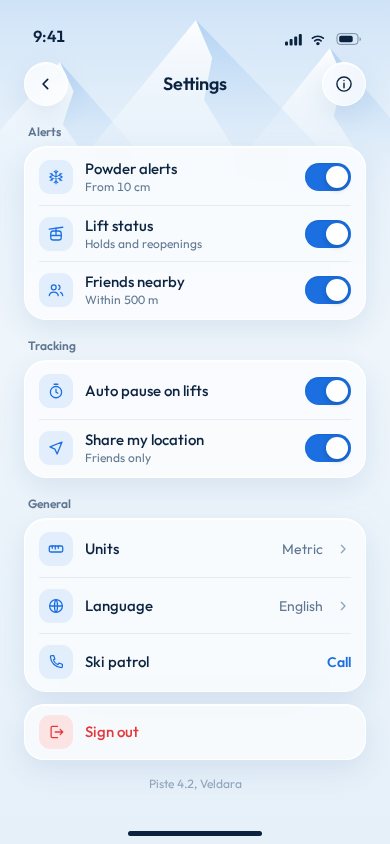
Piste is a complete ski resort app: welcome, sign in, choosing a resort, a home with today's conditions, the snow report and forecast, live lift status and a lift page, a drawn piste map, a run page with its elevation profile, a live run tracker, a day summary and season stats, friends on the mountain, the lift pass, buying a pass, lessons, rentals, notifications, profile and settings. Everything is drawn: faceted peaks, the piste map, lift icons and helmet avatars.
| Detail | Value |
|---|---|
| Screen type | Settings |
| App | Piste: Ski resort companion |
| Category | Sports |
| Design language | Glass, light |
| Type | Outfit |
| Colours | #eaf3fb background, #ffffff surface, #0c2340 text, #5f7691 text-muted, #ff5a1f accent, #ffffff accent-contrast, #1b6fe0 secondary, #d5e3f1 border, #e5383b danger |
What this screen says
- Settings
- Alerts
- Powder alerts
- From 10 cm
- Lift status
- Holds and reopenings
- Friends nearby
- Within 500 m
- Tracking
- Auto pause on lifts
- Share my location
- Friends only
- General
- Units
- Metric
- Language
- English
- Ski patrol
- Call
- Sign out
- Piste 4.2, Veldara
Around it in Piste
More settings screens
- Fairway Settings: Golf course guide and scorecard
- Matchday Settings: Football scores and fantasy
- Rally Settings: Tennis and padel club
- Swell Settings: Surf forecast
- Pitwall Settings: Race engineering
- Elevens Settings: Fantasy cricket leagues
- Scoreboard Settings: Scores and news for every sport
- Bib Settings: Find and enter races
- Wicket Settings: Live cricket scores
- Courtside Settings: Pickup basketball games
- Tack Settings: Sailing wind and regatta tracker
- Frag Settings: Esports tournaments and teams
Every sports app settings screen
What makes a good settings screen
- Group options into clear sections. Account, notifications, privacy, appearance and help, with headings, so people scan to the right group.
- Label settings by their effect. "Daily reminder at 8:00" is clearer than "Reminders". Add a short description under options that need one.
- Use the right control. Toggles for on and off, a row that opens a list for choices, and sliders only for ranges.
- Apply changes immediately. Most mobile settings take effect when changed, with no Save button to forget.
The full settings screen guide and every example
Remix Piste free: describe your own app and it is drawn in this design. Or get its files from $10: Figma, React Native, SwiftUI, Flutter and HTML.