Templates · Settings screens · Sports app · Fairway
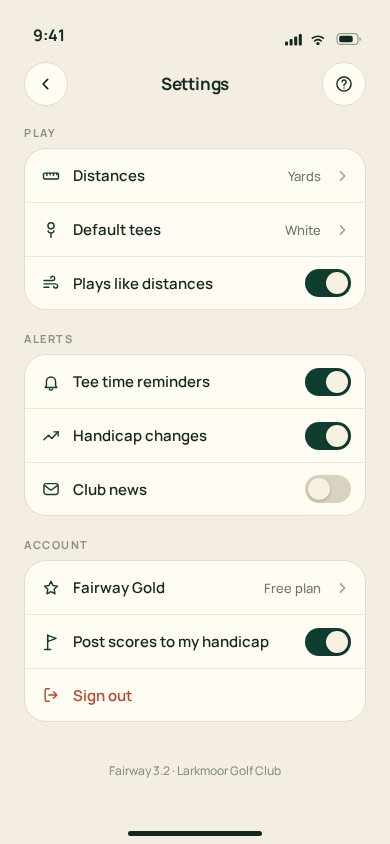
Fairway Settings screen
A settings screen from Fairway, a golf course guide and scorecard app template in a Luxury style. Screen 25 of 25.
Fairway is a complete golf app: onboarding, sign in, a handicap setup, a home with the round in progress, a course guide with all eighteen hole maps drawn from above, live distances to the pin, shot tracking, club distances, a scorecard with score entry, a round summary, stats and a handicap trend, tee time booking with players and a confirmation, a membership, notifications, profile and settings. Clubhouse cream, deep green and old gold with serif numerals.
| Detail | Value |
|---|---|
| Screen type | Settings |
| App | Fairway: Golf course guide and scorecard |
| Category | Sports |
| Design language | Luxury, light |
| Type | Manrope |
| Colours | #f3eee1 background, #fffcf4 surface, #12291f text, #6d7868 text-muted, #0f3d2e accent, #f7f1e1 accent-contrast, #c8a04a secondary, #e4dcc8 border, #b5482f danger |
What this screen says
- Settings
- PLAY
- Distances
- Yards
- Default tees
- White
- Plays like distances
- ALERTS
- Tee time reminders
- Handicap changes
- Club news
- ACCOUNT
- Fairway Gold
- Free plan
- Post scores to my handicap
- Sign out
- Fairway 3.2 · Larkmoor Golf Club
Around it in Fairway
More settings screens
- Tack Settings: Sailing wind and regatta tracker
- Frag Settings: Esports tournaments and teams
- Canter Settings: Riding stables and lessons
- Ollie Settings: Skate spots and clips
- Eddy Settings: River levels for paddlers
- Whistle Settings: Grassroots league manager for coaches
- Oche Settings: Darts scorer and leagues
- Cairn Safety: Trails, contours and summits on one map sheet
- Lapse Settings: Swim training
- Angler Settings: A fishing log drawn on the depth chart
- Piste Settings: Ski resort companion
- Crag Settings: Climbing gym logbook
Every sports app settings screen
What makes a good settings screen
- Group options into clear sections. Account, notifications, privacy, appearance and help, with headings, so people scan to the right group.
- Label settings by their effect. "Daily reminder at 8:00" is clearer than "Reminders". Add a short description under options that need one.
- Use the right control. Toggles for on and off, a row that opens a list for choices, and sliders only for ranges.
- Apply changes immediately. Most mobile settings take effect when changed, with no Save button to forget.
The full settings screen guide and every example
Remix Fairway free: describe your own app and it is drawn in this design. Or get its files from $10: Figma, React Native, SwiftUI, Flutter and HTML.