Templates · Detail screens · Travel app · Wheelhouse
Wheelhouse Trip receipt screen
A detail screen from Wheelhouse, a driver app for ride hailing app template in a Dark-first style. Screen 14 of 25.
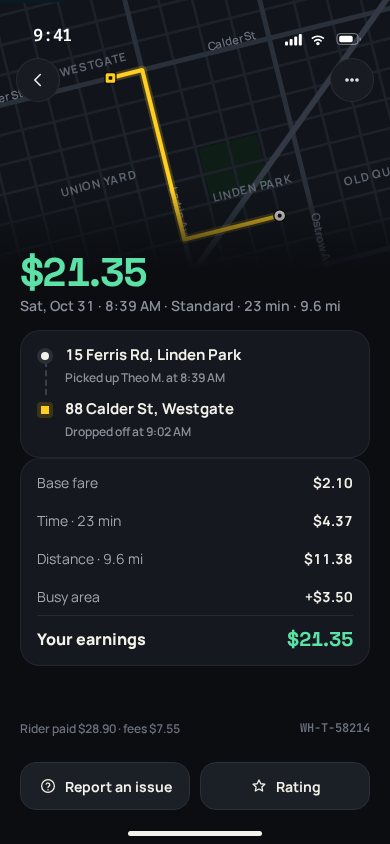
Wheelhouse is a complete ride hailing driver app: welcome and sign in, a home map with a slide to go online, the online state with a demand heat grid, an incoming trip request with fare and countdown, turn by turn navigation to the pickup, waiting at the pickup, rider messages, the trip in progress, trip complete and rating the rider, earnings by week and by day, a trip receipt, instant cash out, the demand map, a destination filter, promotions, a Pro plan, documents, the vehicle, notifications, profile and settings. Blue black asphalt with road marking yellow and mint.
| Detail | Value |
|---|---|
| Screen type | Detail |
| App | Wheelhouse: Driver app for ride hailing |
| Category | Travel |
| Design language | Dark-first, dark |
| Type | Space Grotesk for headings, Manrope for text |
| Colours | #0b0d11 background, #15181e surface, #f3f1ea text, #8b919c text-muted, #ffcf1f accent, #14110a accent-contrast, #5ce1a6 secondary, #262a32 border, #ff5a5f danger |
What this screen says
- Sat, Oct 31 · 8:39 AM · Standard · 23 min · 9.6 mi
- 15 Ferris Rd, Linden Park
- Picked up Theo M. at 8:39 AM
- 88 Calder St, Westgate
- Dropped off at 9:02 AM
- Base fare$2.10
- Time · 23 min$4.37
- Distance · 9.6 mi$11.38
- Busy area+$3.50
- Your earnings$21.35
- Rider paid $28.90 · fees $7.55 WH-T-58214
- Report an issue
- Rating
Around it in Wheelhouse
More detail screens
- Piazza Tour: Self-guided city walking tours
- Fjord Port day: Cruise companion on board
- Atlas Place: Maps and navigation
- Kerb Street bay: Parking that reads like a road sign
- Linea Departures: City transit
- Hollow Stay: Cabin and boutique stays
- Aloft Flight: Flight tracker
- Pitch Campsite: Campsite booking and trip kit
- Hail Safety: Ride hailing
- Volta Station: EV charging
- Museo Exhibition: Museum guide
- Roamly Destination: Trips, stays and experiences
Every travel app detail screen
What makes a good detail screen
- Lead with what identifies the item. A large image or title, the price or status, and the key facts at the top. People should know they are in the right place at a glance.
- Keep the main action visible. A sticky bottom button for Add to cart, Book or Play stays reachable while people scroll through details.
- Order information by importance. The facts that decide the choice come first; reviews, specifications and fine print further down.
- Use progressive disclosure. Long descriptions, specifications and policies can expand on tap rather than filling the screen.
The full detail screen guide and every example
Remix Wheelhouse free: describe your own app and it is drawn in this design. Or get its files from $10: Figma, React Native, SwiftUI, Flutter and HTML.