Templates · Booking and checkout screens · Lifestyle app · Waybill
Waybill Customs screen
A checkout screen from Waybill, a lifestyle app template in a Clinical style. Screen 20 of 25.
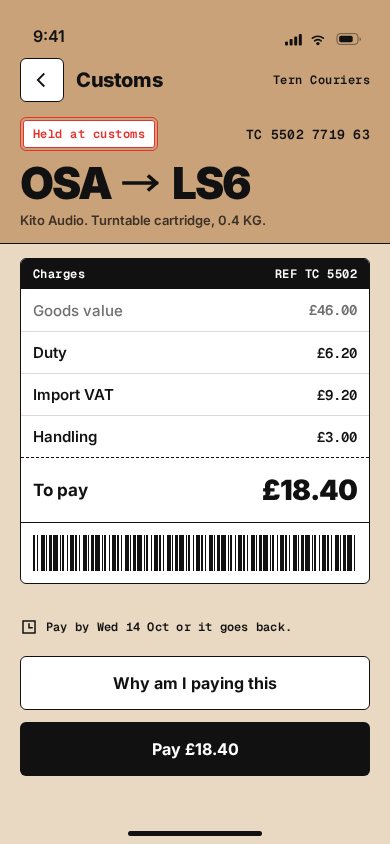
Waybill is waybill gathers every delivery from every shop into one list with live status, a full journey timeline and a courier map. It also covers returns, customs duties, delivery preferences and sending a parcel of your own, from size and courier comparison to a printed label.
| Detail | Value |
|---|---|
| Screen type | Checkout |
| App | Waybill: Every parcel, read like its label |
| Category | Lifestyle |
| Design language | Clinical, light |
| Type | Inter |
| Colours | #ead9c2 background, #ffffff surface, #111111 text, #6b5a47 text-muted, #111111 accent, #ffffff accent-contrast, #c9a27a secondary, #111111 border, #e5322d danger |
What this screen says
- Customs
- Tern Couriers
- Held at customs TC 5502 7719 63
- OSA LS6
- Kito Audio. Turntable cartridge, 0.4 KG.
- Charges REF TC 5502
- Goods value£46.00
- Duty£6.20
- Import VAT£9.20
- Handling£3.00
- To pay
- Pay by Wed 14 Oct or it goes back.
- Why am I paying this
- Pay £18.40
Around it in Waybill
More booking and checkout screens
- Kiln Basket: Handmade marketplace
- Kino Payment: Film and series streaming
- Torque Log a service: The workshop manual for your own car
- Vetly Book a visit: Pet health record
- Trellis Log harvest: Vegetable garden planner
- Posy Delivery: Flower delivery and weekly stems
- Fern Cart: Plant care
- Doorstep Book a viewing: Homes for sale and rent
- Rewear Bag: Secondhand fashion marketplace
- Laced Checkout: Sneaker drops and raffles
- Gloss Pick a time: Salon and spa booking
- Vow Book a visit: Wedding planner
Every lifestyle app checkout screen
What makes a good checkout screen
- Show the total early and honestly. Taxes, delivery and service fees should appear before the last step. A higher total on the final screen feels like a trick.
- Offer wallet payments. Apple Pay and Google Pay skip card typing entirely. Show them first when they are available.
- Ask for the minimum. Only the fields needed to deliver or book. Save details for next time.
- Let people review before paying. A clear summary of items, dates, address and price, with each part editable without starting over.
The full checkout screen guide and every example
Remix Waybill free: describe your own app and it is drawn in this design. Or get its files from $10: Figma, React Native, SwiftUI, Flutter and HTML.