Templates · Onboarding screens · Music app · Wax
Wax Welcome screen
An onboarding screen from Wax, a music streaming app template in a Dark-first style. Screen 1 of 25.
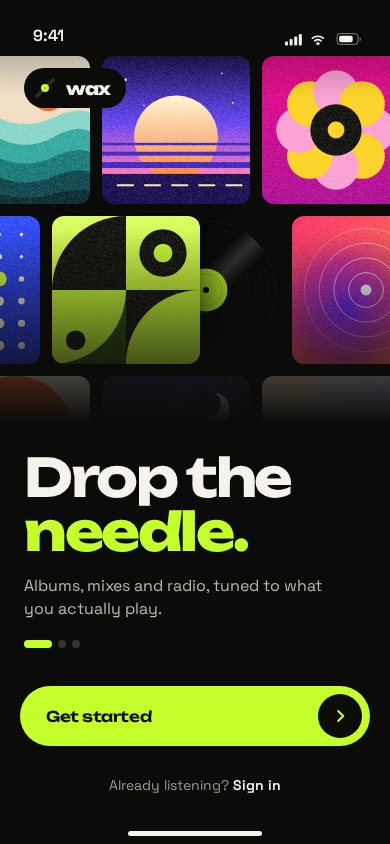
Wax is a complete music streaming app: welcome, sign in, picking your sound, a home with a daily mix and new releases, search and results, album and artist pages, now playing with a waveform scrubber, the queue and synced lyrics, a library with playlists, liked songs and downloads, listening stats, an equaliser, a Plus plan with checkout, notifications, profile and settings. Every cover is drawn: flat shapes, gradients and grain.
| Detail | Value |
|---|---|
| Screen type | Onboarding |
| App | Wax: Music streaming |
| Category | Music |
| Design language | Dark-first, dark |
| Type | Space Grotesk |
| Colours | #0b0b0a background, #171715 surface, #f5f3ec text, #9a988e text-muted, #c5ff2b accent, #0c0d08 accent-contrast, #7b61ff secondary, #2a2a26 border, #ff5a4d danger |
What this screen says
- wax
- Drop the
- needle.
- Albums, mixes and radio, tuned to what you actually play.
- Get started
- Already listening? Sign in
Around it in Wax
More onboarding screens
- Hum Welcome: Song recognition
- Riff Welcome: Upload and discover new tracks
- Groove Welcome: Vinyl collection and crate digging
- Crossfade Welcome: DJ mixing on the go
- Fork Welcome: Tuner and metronome
- Belt Welcome: Karaoke nights
- Crowd Welcome: Concert diary and setlists
- Dial Welcome: Internet radio from everywhere
- Chorus Welcome: Singing lessons and pitch training
- Verse Welcome: Songwriting notebook
- Masters Welcome: Royalties and streams for artists
- Sonata Welcome: Concert hall season and tickets
Every music app onboarding screen
What makes a good onboarding screen
- One idea per screen. Each screen should say one thing in a headline people can read in a second. If a screen needs a paragraph, it is doing too much.
- Personalise with a purpose. Ask a question only if the answer changes what people see next, like a goal, a level or an interest. Then show that the answer mattered.
- Explain permissions before asking. Show your own screen saying why you need notifications, location or the camera before the system prompt. People who understand the reason are more likely to allow it.
- Let people skip. A visible skip or "I'll do this later" respects returning users and the impatient. Make sure skipping still lands them somewhere useful.
The full onboarding screen guide and every example
Remix Wax free: describe your own app and it is drawn in this design. Or get its files from $10: Figma, React Native, SwiftUI, Flutter and HTML.