Templates · Form and input screens · Lifestyle app · Vow
Vow Add guest screen
A form screen from Vow, a wedding planner app template in a Luxury style. Screen 13 of 25.
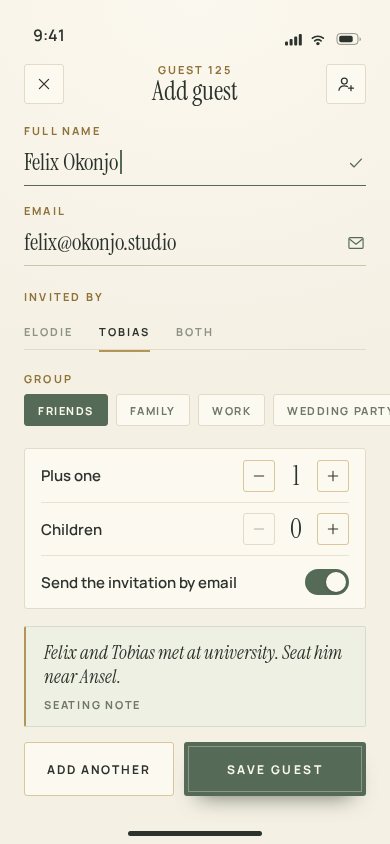
Vow is a complete wedding planner: welcome, sign in, setting up the day, a home with the countdown inside a botanical wreath, a checklist by month, a budget with a category breakdown, the guest list, one guest, RSVPs with meal counts, a seating chart drawn as round tables named after plants, vendors, booking a visit, the day's timeline, the registry, a paid tier, profile and settings. Everything is typeset like fine stationery in ivory, sage and gold.
| Detail | Value |
|---|---|
| Screen type | Form |
| App | Vow: Wedding planner |
| Category | Lifestyle |
| Design language | Luxury, light |
| Type | Manrope |
| Colours | #f5f0e4 background, #fcf9f1 surface, #2b332c text, #6f766a text-muted, #556b57 accent, #fcf9f1 accent-contrast, #b39558 secondary, #e3dbc8 border, #a8573f danger |
What this screen says
- Guest 125
- Add guest
- Full name
- Felix Okonjo
- felix@okonjo.studio
- Invited by
- Elodie Tobias Both
- Group
- Friends Family Work Wedding party
- Plus one
- Children
- Send the invitation by email
- Felix and Tobias met at university. Seat him near Ansel.
- Seating note
- Add another
- Save guest
Around it in Vow
More form and input screens
- Lendly Return: Borrow things from neighbours
- Stub Transfer: Fan to fan ticket resale
- Trove Save: Visual ideas and boards
- Vidi Details: Video platform for creators
- Roll New album: Photo library and backups
- Splice Speed: Video editor for short clips
- Blush Filters: Beauty and makeup shopping
- Flatpack Assembly: Furniture store with room previews
- Column Compose: Newsletters and independent writers
- Fetch Add pet: Dog walkers and pet sitters
- Forecourt Finance: Buy and sell used cars
- Tower Top up: Mobile plan, data and bills
Every lifestyle app form screen
What makes a good form screen
- Ask only what you need. Every field is a reason to stop. Remove optional fields or move them to later.
- Labels above fields. Visible labels stay readable while people type; placeholder-only labels disappear.
- Use the right keyboard and input. Number pads for amounts, email keyboards for email, pickers for dates and autofill for addresses and codes.
- Validate as people go. Show problems next to the field when people leave it, in words that say how to fix them.
The full form screen guide and every example
Remix Vow free: describe your own app and it is drawn in this design. Or get its files from $10: Figma, React Native, SwiftUI, Flutter and HTML.