Templates · List and feed screens · Smart home app · Upkeep
Upkeep Home log screen
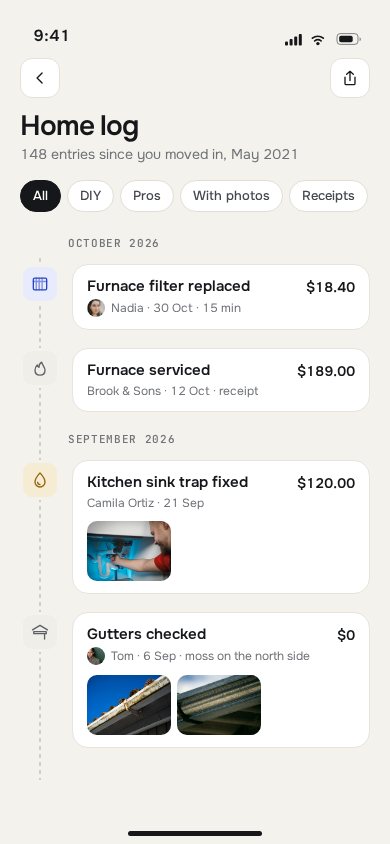
A list screen from Upkeep, a home maintenance calendar app template in a Minimal style. Screen 21 of 25.
Upkeep is a complete home maintenance app: welcome, home setup and sign in, a today screen with the overdue task and the next two weeks, a month calendar, task details with a step by step guide, logging a task and its confirmation, new recurring tasks, a blueprint floor plan with pinned tasks, rooms, equipment with lifespans, an appliance page, a rating label scanner, finding, booking and confirming a local pro, costs, a home log, notifications, Upkeep Plus, profile and settings. Stone and white with cobalt blueprint drawings, ochre for soon and brick for late.
| Detail | Value |
|---|---|
| Screen type | List |
| App | Upkeep: Home maintenance calendar |
| Category | Smart home |
| Design language | Minimal, light |
| Type | Onest |
| Colours | #f3f2ed background, #ffffff surface, #15171a text, #6f7277 text-muted, #2846c4 accent, #ffffff accent-contrast, #c98a1b secondary, #e6e4dc border, #c9502c danger |
What this screen says
- Home log
- 148 entries since you moved in, May 2021
- All DIY Pros With photos Receipts
- October 2026
- Furnace filter replaced
- Nadia · 30 Oct · 15 min
- Furnace serviced
- Brook & Sons · 12 Oct · receipt
- September 2026
- Kitchen sink trap fixed
- Camila Ortiz · 21 Sep
- Gutters checked
- Tom · 6 Sep · moss on the north side
Around it in Upkeep
More list and feed screens
- Sundial Roof: Solar panels and home battery
- Puddle Zones: Garden watering and sprinklers
- Kelvin Rooms: Climate and thermostat
- Glow Rooms: Light scenes and colour
- Tagged Rooms: Home inventory for insurance
- Lobby Packages: Apartment building app
- Sweep Rooms: Robot vacuum and mop
- Dusk Notifications: Smart home scenarios
- Lumen Notifications: Smart home energy
- Abode Notifications: Smart home devices
- Boxed Inventory: Book movers and plan moving day
- Meter Readings: Your energy supplier account
Every smart home app list screen
What makes a good list screen
- Show what people need to decide. Each row should carry just enough to choose: a title, one or two details and a status. Everything else belongs on the detail screen.
- Keep rows consistent. The same information in the same place on every row lets people scan down a column instead of reading each item.
- Group with headings. Dates, categories or status headings break long lists into chunks people can skip through.
- Make common actions quick. Swipe actions, a checkbox or a heart on the row save opening the item for small tasks.
The full list screen guide and every example
Remix Upkeep free: describe your own app and it is drawn in this design. Or get its files from $10: Figma, React Native, SwiftUI, Flutter and HTML.