Templates · Sign in and sign up screens · Productivity app · Tunnel
Tunnel Sign in screen
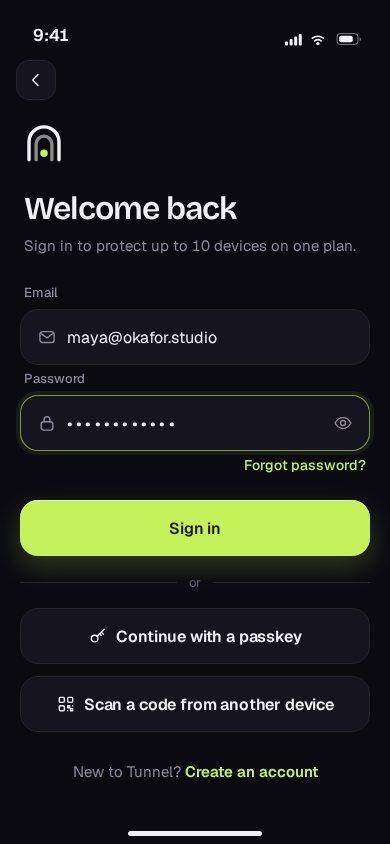
A sign in screen from Tunnel, a VPN and online privacy app template in a Dark-first style. Screen 2 of 25.
Tunnel is a complete VPN and privacy app: welcome, sign in and VPN permission, a one tap connect home inside a glowing tunnel, the connecting handshake, a dot matrix server map, a country list and a country with its cities, live connection details, specialty servers and double hop, protocols, kill switch, split tunnelling, threat protection with a blocked log, a data breach monitor and a leak, a speed test, plans, checkout and a success screen, notifications, account and settings. Aubergine black and plum graphite with signal lime and lavender.
| Detail | Value |
|---|---|
| Screen type | Sign in |
| App | Tunnel: VPN and online privacy |
| Category | Productivity |
| Design language | Dark-first, dark |
| Type | Bricolage Grotesque for headings, Geist for text |
| Colours | #0b0a11 background, #16141e surface, #f2f0f7 text, #8d879b text-muted, #c5f25a accent, #141a05 accent-contrast, #a796ff secondary, #26222f border, #ff6b5b danger |
What this screen says
- Welcome back
- Sign in to protect up to 10 devices on one plan.
- maya@okafor.studio
- Password
- ••••••••••••
- Forgot password?
- Sign in
- or
- Continue with a passkey
- Scan a code from another device
- New to Tunnel? Create an account
Around it in Tunnel
More sign in and sign up screens
- Jot Sign in: Quick notes and checklists
- Chrono Sign in: World clock, timers and stopwatch
- Frontdesk Sign in: Customer support inbox
- Campaign Sign in: Email marketing campaigns
- Outpost Sign in: Schedule social posts
- Pageview Sign in: Website analytics
- Polish Sign in: Writing assistant and keyboard
- Tapline Sign up: Link-in-bio pages and analytics
- Quill Sign in: Docs, wikis and databases in one workspace
- Tandem Sign in: Team chat, channels and huddles
- Shipyard Sign in: Issue tracking for product teams
- Canvas Sign in: Design files and comments on mobile
Every productivity app sign in screen
What makes a good login screen
- Offer the fastest option first. Sign in with Apple, Google or a passkey takes one tap. If you support them, put them above the email form. Apple asks apps that use a third-party login like Google to also offer an equivalent privacy-focused option, such as Sign in with Apple.
- Separate sign in from sign up clearly. Use different headings and buttons, and a clear link to switch. People who already have an account should never end up creating a second one by accident.
- Use the right keyboard and autofill. Email fields should open the email keyboard and support password managers and one-time code autofill. Small details, big difference in how many people get through.
- Write errors that help. "That password doesn't match this email" is better than "Error 401". Keep what people typed so they only fix the part that was wrong.
The full login screen guide and every example
Remix Tunnel free: describe your own app and it is drawn in this design. Or get its files from $10: Figma, React Native, SwiftUI, Flutter and HTML.