Templates · Detail screens · Lifestyle app · Trellis
Trellis Pests screen
A detail screen from Trellis, a vegetable garden planner app template in a Minimal style. Screen 21 of 25.
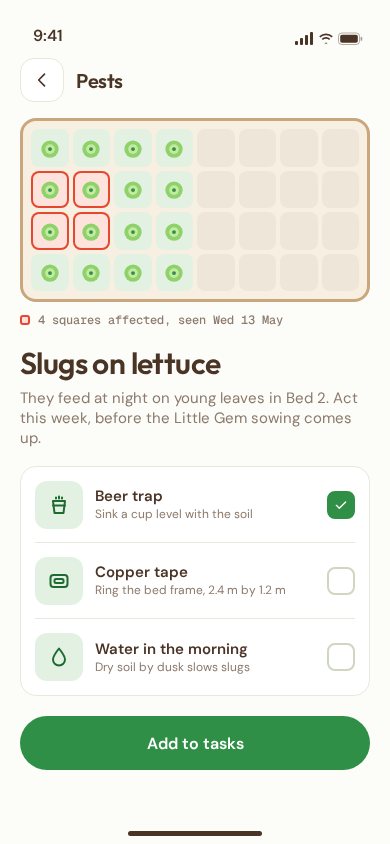
Trellis is trellis plans a vegetable plot square by square. It covers laying out beds, what to sow this week, a sowing calendar, watering and rain, the harvest log with weights, crop rotation across four bed groups and the season between frost dates.
| Detail | Value |
|---|---|
| Screen type | Detail |
| App | Trellis: Vegetable garden planner |
| Category | Lifestyle |
| Design language | Minimal, light |
| Type | DM Sans |
| Colours | #fcfdf9 background, #ffffff surface, #4a3426 text, #8c7a6c text-muted, #2f8f46 accent, #ffffff accent-contrast, #f6c945 secondary, #e6eadc border, #e5482f danger |
What this screen says
- Pests
- 4 squares affected, seen Wed 13 May
- Slugs on lettuce
- They feed at night on young leaves in Bed 2. Act this week, before the Little Gem sowing comes up.
- Beer trapSink a cup level with the soil
- Copper tapeRing the bed frame, 2.4 m by 1.2 m
- Water in the morningDry soil by dusk slows slugs
- Add to tasks
Around it in Trellis
More detail screens
- Marquee Film: Cinema tickets and watchlist
- Handy Cleaning: Home services
- Tasker Furniture assembly: Book and do local odd jobs
- Toolbox Product: Hardware store and project lists
- Brief Full story: News in sixty words
- Kibble Product: Pet supplies and autoship
- Filmlog Film: Film diary and reviews
- Guardrail Child: Parental controls and screen time
- Collar Escape alert: GPS pet tracker
- Postage Item: Send parcels and find drop-off points
- Specs Frame: Glasses with virtual try-on
- Circuit Product: Electronics store with trade-in and repairs
Every lifestyle app detail screen
What makes a good detail screen
- Lead with what identifies the item. A large image or title, the price or status, and the key facts at the top. People should know they are in the right place at a glance.
- Keep the main action visible. A sticky bottom button for Add to cart, Book or Play stays reachable while people scroll through details.
- Order information by importance. The facts that decide the choice come first; reviews, specifications and fine print further down.
- Use progressive disclosure. Long descriptions, specifications and policies can expand on tap rather than filling the screen.
The full detail screen guide and every example
Remix Trellis free: describe your own app and it is drawn in this design. Or get its files from $10: Figma, React Native, SwiftUI, Flutter and HTML.