Templates · Success and confirmation screens · Lifestyle app · Torque
Torque Booked screen
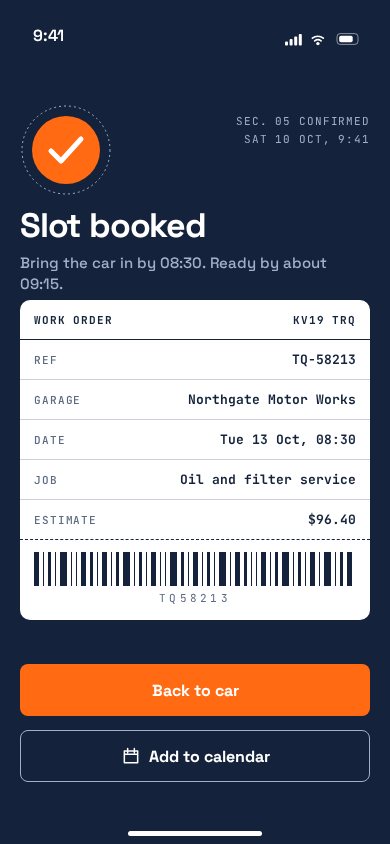
A success screen from Torque, a lifestyle app template in an Enterprise style. Screen 20 of 25.
Torque is torque keeps one car's service history, mileage based reminders, parts, fuel fill ups and running costs. It also books a garage slot and explains every dashboard warning light.
| Detail | Value |
|---|---|
| Screen type | Success |
| App | Torque: The workshop manual for your own car |
| Category | Lifestyle |
| Design language | Enterprise, light |
| Type | Space Grotesk |
| Colours | #e8ebee background, #ffffff surface, #14233b text, #5b6a80 text-muted, #ff6a13 accent, #ffffff accent-contrast, #22375a secondary, #c9d0d8 border, #d92d20 danger |
What this screen says
- SEC. 05 CONFIRMED
- SAT 10 OCT, 9:41
- Slot booked
- Bring the car in by 08:30. Ready by about 09:15.
- WORK ORDER KV19 TRQ
- REF TQ-58213
- GARAGE Northgate Motor Works
- DATE Tue 13 Oct, 08:30
- JOB Oil and filter service
- ESTIMATE $96.40
- TQ58213
- Back to car
- Add to calendar
Around it in Torque
More success and confirmation screens
- Stitch Finished: A knitting companion drawn as one big knitting chart
- Roost Chore done: Your shared house, stuck to the fridge door
- Trellis Harvest logged: Vegetable garden planner
- Grain Exported: Camera and photo editor
- Posy Confirmed: Flower delivery and weekly stems
- Fern Watered: Plant care
- Doorstep Viewing booked: Homes for sale and rent
- Rewear Listed: Secondhand fashion marketplace
- Laced Entry confirmed: Sneaker drops and raffles
- Gloss Booked: Salon and spa booking
- Vow Visit booked: Wedding planner
- Drizzle Welcome to Plus: Weather with living skies
Every lifestyle app success screen
What makes a good confirmation screen
- Confirm in the headline. "Payment sent", "Table booked for Friday at 8" or "Lesson complete" in plain words, with a clear success colour or icon.
- Repeat the key details. Amount, date, reference number or score, so people do not need to check elsewhere that the right thing happened.
- Say what happens next. When the order arrives, when the money lands, when the next lesson unlocks.
- Offer the next step. Track the order, add to calendar, share, or start the next lesson. One primary action and a way back home.
The full confirmation screen guide and every example
Remix Torque free: describe your own app and it is drawn in this design. Or get its files from $10: Figma, React Native, SwiftUI, Flutter and HTML.