Templates · Sign in and sign up screens · Lifestyle app · Toolbox
Toolbox Sign in screen
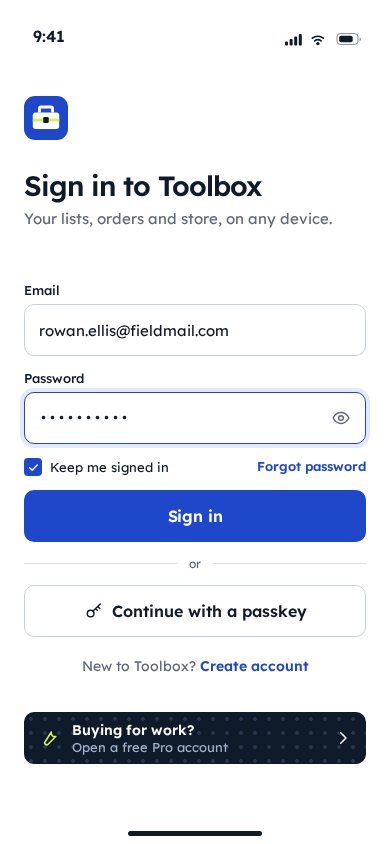
A sign in screen from Toolbox, a hardware store and project lists app template in an Enterprise style. Screen 3 of 25.
Toolbox is a complete hardware store app: welcome, choosing a home store, sign in, a home with a ready pickup, the active project and departments, search with aisle, bay and stock on every result, a product page with specs and questions, a store floor plan with a walking route, a barcode scanner, project lists sorted by aisle with a decking calculator, a cart split into pickup and delivery, checkout, order placed, orders and a pickup locker, tool rental with a reservation, a Pro plan with job spend, notifications, profile and settings. Cool grey and white with ink, cobalt and a lime signal.
| Detail | Value |
|---|---|
| Screen type | Sign in |
| App | Toolbox: Hardware store and project lists |
| Category | Lifestyle |
| Design language | Enterprise, light |
| Type | Lexend |
| Colours | #eef1f4 background, #ffffff surface, #0f1a2a text, #5d6878 text-muted, #1f47c9 accent, #ffffff accent-contrast, #d4f34a secondary, #dce1e8 border, #cf3a3a danger |
What this screen says
- Sign in to Toolbox
- Your lists, orders and store, on any device.
- rowan.ellis@fieldmail.com
- Password
- ••••••••••
- Keep me signed in Forgot password
- Sign in
- or
- Continue with a passkey
- New to Toolbox? Create account
- Buying for work?Open a free Pro account
Around it in Toolbox
More sign in and sign up screens
- Bazaar Sign in: Local buy and sell
- Kiln Sign in: Handmade marketplace
- Drape Sign in: AI wardrobe and daily outfits
- Mane Sign in: AI hairstyle try-on
- Annex Sign in: AI interior redesign
- Kino Sign in: Film and series streaming
- Waybill Sign in: Every parcel, read like its label
- Torque Sign in: The workshop manual for your own car
- Vetly Sign in: Pet health record
- Stitch Sign in: A knitting companion drawn as one big knitting chart
- Roost Sign in: Your shared house, stuck to the fridge door
- Trellis Sign in: Vegetable garden planner
Every lifestyle app sign in screen
What makes a good login screen
- Offer the fastest option first. Sign in with Apple, Google or a passkey takes one tap. If you support them, put them above the email form. Apple asks apps that use a third-party login like Google to also offer an equivalent privacy-focused option, such as Sign in with Apple.
- Separate sign in from sign up clearly. Use different headings and buttons, and a clear link to switch. People who already have an account should never end up creating a second one by accident.
- Use the right keyboard and autofill. Email fields should open the email keyboard and support password managers and one-time code autofill. Small details, big difference in how many people get through.
- Write errors that help. "That password doesn't match this email" is better than "Error 401". Keep what people typed so they only fix the part that was wrong.
The full login screen guide and every example
Remix Toolbox free: describe your own app and it is drawn in this design. Or get its files from $10: Figma, React Native, SwiftUI, Flutter and HTML.