Templates · Form and input screens · Education app · Tiles
Tiles New league screen
A form screen from Tiles, a daily word and number puzzles app template in a Playful style. Screen 20 of 25.
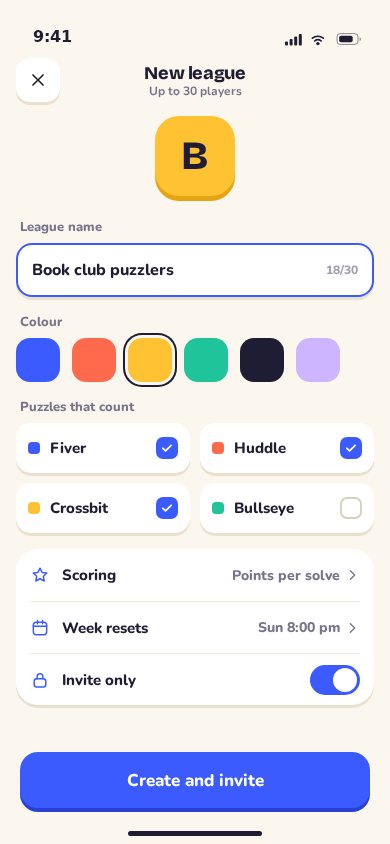
Tiles is a complete daily puzzle app: welcome, picking your daily mix, sign in, a Today hub with four puzzles and your streak, Fiver (a five letter word in six tries) with its keyboard, a solved screen, guess stats and a shareable result card, Huddle (sort sixteen words into four sets) and its solved board, Crossbit (a five by five mini crossword), Bullseye (hit a target number with six tiles) and its how to play, the archive calendar, themed puzzle packs, overall stats, leagues with a daily leaderboard and a new league form, a Plus plan with checkout, notifications, profile and settings.
| Detail | Value |
|---|---|
| Screen type | Form |
| App | Tiles: Daily word and number puzzles |
| Category | Education |
| Design language | Playful, light |
| Type | Bricolage Grotesque for headings, Nunito for text |
| Colours | #fbf7ef background, #ffffff surface, #1f1d33 text, #77738a text-muted, #3b5bff accent, #ffffff accent-contrast, #ff6a4d secondary, #ece4d4 border, #e04f33 danger |
What this screen says
- New leagueUp to 30 players
- League name
- Book club puzzlers18/30
- Colour
- Puzzles that count
- Fiver
- Huddle
- Crossbit
- Bullseye
- ScoringPoints per solve
- Week resetsSun 8:00 pm
- Invite only
- Create and invite
Around it in Tiles
More form and input screens
- Almanac Edit section: The free encyclopedia reader
- Stacks Renew: Borrow e-books and audiobooks from your library
- Penpal Correct: Language exchange chat
- Lexis Quiz: A word a day
- Quanta Quiz: Interactive physics lessons
- Cram New card: Exam prep and mock tests
- Quad Submit: University campus app
- Palm Quiz: Learn sign language
- Epoch Quiz: History on a timeline
- Wren Trace: Early reading for kids
- Proof Ask Proof: Maths tutor that shows its working
- Skim Your goal: Speed reading trainer
Every education app form screen
What makes a good form screen
- Ask only what you need. Every field is a reason to stop. Remove optional fields or move them to later.
- Labels above fields. Visible labels stay readable while people type; placeholder-only labels disappear.
- Use the right keyboard and input. Number pads for amounts, email keyboards for email, pickers for dates and autofill for addresses and codes.
- Validate as people go. Show problems next to the field when people leave it, in words that say how to fix them.
The full form screen guide and every example
Remix Tiles free: describe your own app and it is drawn in this design. Or get its files from $10: Figma, React Native, SwiftUI, Flutter and HTML.