Templates · Form and input screens · Education app · Quad
Quad Submit screen
A form screen from Quad, a university campus app template in an Enterprise style. Screen 10 of 25.
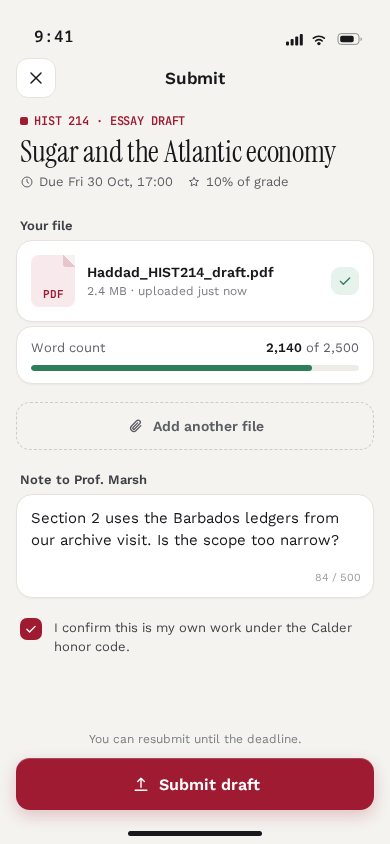
Quad is a complete campus app for a student at Calder University: welcome, sign in with a Calder ID and a code check, a Today home with the next class, a week timetable, class and course pages, a recorded lecture with chapters, assignments, a file submission with a receipt, grades with a GPA trend, next term's course search, enrollment and confirmation, a campus map, the library with live busyness, study room booking, a live shuttle, dining, meal plans, a digital campus ID, notifications, profile and settings. Stone and white with collegiate crimson, gold and four course colours.
| Detail | Value |
|---|---|
| Screen type | Form |
| App | Quad: University campus app |
| Category | Education |
| Design language | Enterprise, light |
| Type | Instrument Serif for headings, Work Sans for text |
| Colours | #f4f3ef background, #ffffff surface, #17181c text, #7a7c84 text-muted, #9e1b32 accent, #ffffff accent-contrast, #f2b731 secondary, #e6e3dc border, #d2382f danger |
What this screen says
- Submit
- HIST 214 · ESSAY DRAFT
- Sugar and the Atlantic economy
- Due Fri 30 Oct, 17:00 10% of grade
- Your file
- Haddad_HIST214_draft.pdf2.4 MB · uploaded just now
- Word count 2,140 of 2,500
- Add another file
- Note to Prof. Marsh
- Section 2 uses the Barbados ledgers from our archive visit. Is the scope too narrow?84 / 500
- I confirm this is my own work under the Calder honor code.
- You can resubmit until the deadline.
- Submit draft
Around it in Quad
More form and input screens
- Stacks Renew: Borrow e-books and audiobooks from your library
- Penpal Correct: Language exchange chat
- Lexis Quiz: A word a day
- Quanta Quiz: Interactive physics lessons
- Cram New card: Exam prep and mock tests
- Palm Quiz: Learn sign language
- Epoch Quiz: History on a timeline
- Wren Trace: Early reading for kids
- Proof Ask Proof: Maths tutor that shows its working
- Skim Your goal: Speed reading trainer
- Terra Quiz setup: Geography and flags quiz
- Gambit Play: Chess training
Every education app form screen
What makes a good form screen
- Ask only what you need. Every field is a reason to stop. Remove optional fields or move them to later.
- Labels above fields. Visible labels stay readable while people type; placeholder-only labels disappear.
- Use the right keyboard and input. Number pads for amounts, email keyboards for email, pickers for dates and autofill for addresses and codes.
- Validate as people go. Show problems next to the field when people leave it, in words that say how to fix them.
The full form screen guide and every example
Remix Quad free: describe your own app and it is drawn in this design. Or get its files from $10: Figma, React Native, SwiftUI, Flutter and HTML.