Templates · Paywall screens · Finance app · Ticker
Ticker Pro screen
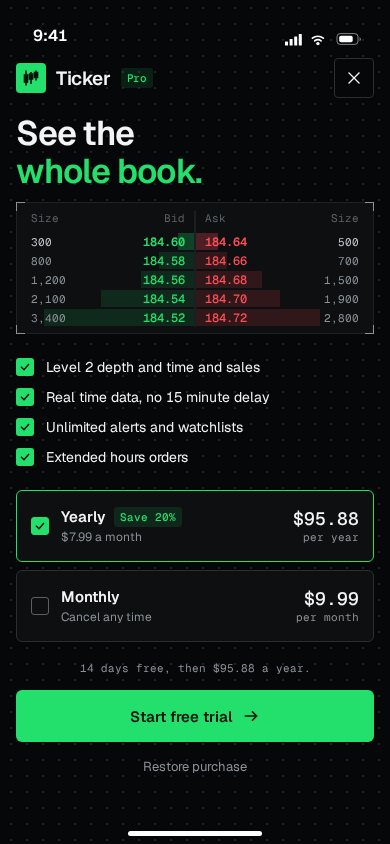
A paywall screen from Ticker, a stock investing app template in a Dark-first style. Screen 22 of 25.
Ticker is a complete stock investing app: welcome, sign in, account creation and a passcode, a home with portfolio value and a dense watchlist, search, markets with indices and a sector heatmap, movers, a stock page with candles and key stats, a full chart, an order ticket with a keypad, review and confirmation, orders, portfolio and holdings, news and a story, an earnings calendar, price alerts, adding funds, a Pro plan, notifications, account and settings. Green means up or buy and red means down or sell, nowhere else.
| Detail | Value |
|---|---|
| Screen type | Paywall |
| App | Ticker: Stock investing |
| Category | Finance |
| Design language | Dark-first, dark |
| Type | Geist |
| Colours | #060708 background, #0d0f11 surface, #f2f4f5 text, #8a9299 text-muted, #22e06b accent, #03140a accent-contrast, #ffb224 secondary, #1e2226 border, #ff4d57 danger |
What this screen says
- TickerPro
- See the whole book.
- Level 2 depth and time and sales
- Real time data, no 15 minute delay
- Unlimited alerts and watchlists
- Extended hours orders
- YearlySave 20%
- $7.99 a month
- $95.88per year
- Monthly
- Cancel any time
- $9.99per month
- 14 days free, then $95.88 a year.
- Start free trial
- Restore purchase
Around it in Ticker
More paywall screens
- Wage Plus: Get paid as you work
- Keystone Pro: Mortgage and home loan tracker
- Rebate Plus: Cashback card and rewards
- Aegis Plus: Insurance policies and claims
- Till Plus: Card reader and sales for small shops
- Strike Pro: Options trading
- Prism Pro: Net worth across every account
- Folio Gold: Stocks and ETF investing
- Halden Metal: Premium neobank
- Billable Pro: Time tracking and invoices, kept like a ledger
- Lease Plus: Your tenancy, drawn to plan
- Claim Plus: Expenses, filed like a till receipt
Every finance app paywall screen
What makes a good paywall screen
- Lead with the outcome, not the feature list. The headline should say what changes for the person: "Train smarter every week" beats "Unlock Premium". Three to five benefits underneath are enough; more turns into a wall of ticks nobody reads.
- Show the real price, period and trial terms. State the price, how often it renews and when a free trial turns into a charge, near the button. Apple's App Store guideline 3.1.2 asks subscription apps to make this clear before purchase, and Google Play has similar rules.
- One primary button. The main call to action should be impossible to miss and say what happens: "Start 7-day free trial" or "Subscribe for $4.99/month". A second plan choice is fine; a second competing button is not.
- Make the plans easy to compare. When you offer monthly and yearly, show both prices in the same unit (per month or per week) and mark the saving on the yearly plan in plain numbers, not just a badge.
The full paywall screen guide and every example
Remix Ticker free: describe your own app and it is drawn in this design. Or get its files from $10: Figma, React Native, SwiftUI, Flutter and HTML.