Templates · Paywall screens · Finance app · Billable
Billable Pro screen
A paywall screen from Billable, a finance app template in a Minimal style. Screen 23 of 25.
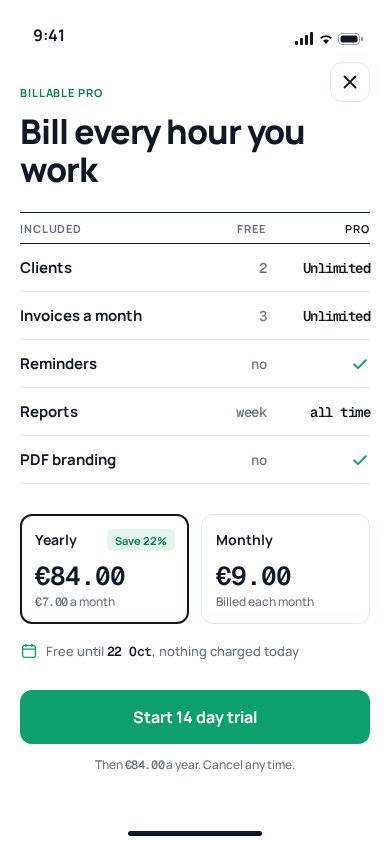
Billable is billable covers a freelancer's whole billing loop: run a timer per client, review the day and the week as blocks of hours, manage clients and projects, then build, send and chase invoices. Reports, notifications, a Pro plan, profile and settings round it out.
| Detail | Value |
|---|---|
| Screen type | Paywall |
| App | Billable: Time tracking and invoices, kept like a ledger |
| Category | Finance |
| Design language | Minimal, light |
| Type | Manrope |
| Colours | #ffffff background, #f1faf5 surface, #101828 text, #667085 text-muted, #0e9f6e accent, #ffffff accent-contrast, #f59e0b secondary, #d5eee2 border, #d92d20 danger |
What this screen says
- Billable Pro
- Bill every hour you work
- Included Free Pro
- Clients 2 Unlimited
- Invoices a month 3 Unlimited
- Reminders no
- Reports week all time
- PDF branding no
- YearlySave 22% €84.00
- €7.00 a month
- Monthly€9.00
- Billed each month
- Free until 22 Oct, nothing charged today
- Start 14 day trial
- Then €84.00 a year. Cancel any time.
Around it in Billable
More paywall screens
- Folio Gold: Stocks and ETF investing
- Halden Metal: Premium neobank
- Lease Plus: Your tenancy, drawn to plan
- Claim Plus: Expenses, filed like a till receipt
- Tally Plus: Monthly budgeting
- Divvy Plus: Split bills with friends
- Ticker Pro: Stock investing
- Burrow Plus: Shared savings pots
- Remit Plus: International money transfer
- Piggy Family: Pocket money for kids
- Settle Plus: Bill payments and banking
- Fathom Plus: Crypto wallet
Every finance app paywall screen
What makes a good paywall screen
- Lead with the outcome, not the feature list. The headline should say what changes for the person: "Train smarter every week" beats "Unlock Premium". Three to five benefits underneath are enough; more turns into a wall of ticks nobody reads.
- Show the real price, period and trial terms. State the price, how often it renews and when a free trial turns into a charge, near the button. Apple's App Store guideline 3.1.2 asks subscription apps to make this clear before purchase, and Google Play has similar rules.
- One primary button. The main call to action should be impossible to miss and say what happens: "Start 7-day free trial" or "Subscribe for $4.99/month". A second plan choice is fine; a second competing button is not.
- Make the plans easy to compare. When you offer monthly and yearly, show both prices in the same unit (per month or per week) and mark the saving on the yearly plan in plain numbers, not just a badge.
The full paywall screen guide and every example
Remix Billable free: describe your own app and it is drawn in this design. Or get its files from $10: Figma, React Native, SwiftUI, Flutter and HTML.