Templates · Detail screens · Sports app · Tack
Tack Session screen
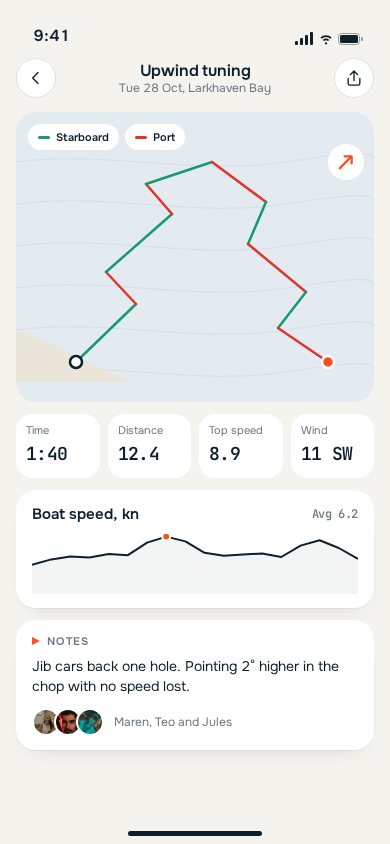
A detail screen from Tack, a sailing wind and regatta tracker app template in a Minimal style. Screen 18 of 25.
Tack is a complete sailing companion: welcome, boat setup and sign in, a wind home with a live dial and hourly strip, a wind forecast with gust bands and shifts, venue explore and detail with tide, regattas with entry, fee checkout and confirmation, a start sequence with signal flags and line bias, a live race on a course map with tacks drawn, results, race analysis, a logbook with sessions, a season dashboard, boat polars, notifications, a Pro plan, profile and settings. Sailcloth white and navy ink with a spinnaker orange accent.
| Detail | Value |
|---|---|
| Screen type | Detail |
| App | Tack: Sailing wind and regatta tracker |
| Category | Sports |
| Design language | Minimal, light |
| Type | JetBrains Mono for headings, Onest for text |
| Colours | #f4f3ee background, #ffffff surface, #0c1f2c text, #6b7780 text-muted, #ff4f1f accent, #ffffff accent-contrast, #1d4f7a secondary, #e2e0d7 border, #e0352b danger |
What this screen says
- Upwind tuning
- Tue 28 Oct, Larkhaven Bay
- Starboard Port
- Time1:40
- Distance12.4
- Top speed8.9
- Wind11 SW
- Boat speed, knAvg 6.2
- Notes
- Jib cars back one hole. Pointing 2° higher in the chop with no speed lost.
- Maren, Teo and Jules
Around it in Tack
More detail screens
- Piste Gondola: Ski resort companion
- Crag Gym: Climbing gym logbook
- Fairway Course: Golf course guide and scorecard
- Matchday Lineups: Football scores and fantasy
- Rally Club: Tennis and padel club
- Swell Tides: Surf forecast
- Pitwall Tyres: Race engineering
- Elevens Match: Fantasy cricket leagues
- Scoreboard Box score: Scores and news for every sport
- Bib Race: Find and enter races
- Wicket Scorecard: Live cricket scores
- Courtside Court: Pickup basketball games
Every sports app detail screen
What makes a good detail screen
- Lead with what identifies the item. A large image or title, the price or status, and the key facts at the top. People should know they are in the right place at a glance.
- Keep the main action visible. A sticky bottom button for Add to cart, Book or Play stays reachable while people scroll through details.
- Order information by importance. The facts that decide the choice come first; reviews, specifications and fine print further down.
- Use progressive disclosure. Long descriptions, specifications and policies can expand on tap rather than filling the screen.
The full detail screen guide and every example
Remix Tack free: describe your own app and it is drawn in this design. Or get its files from $10: Figma, React Native, SwiftUI, Flutter and HTML.