Templates · List and feed screens · Food app · Tabla
Tabla Saved screen
A list screen from Tabla, a tables worth dressing for app template in a Luxury style. Screen 20 of 25.
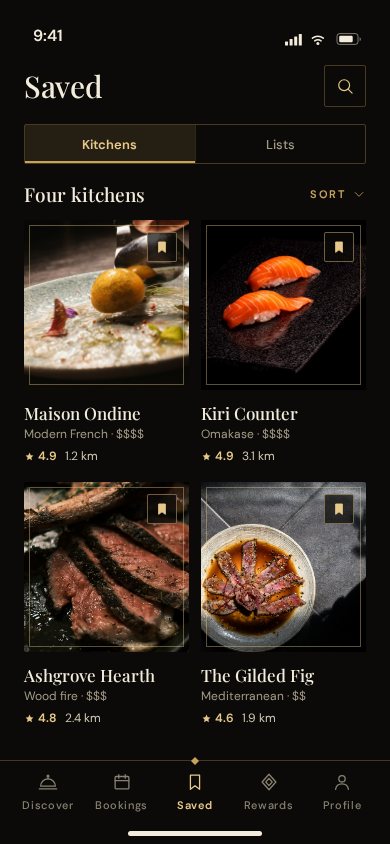
Tabla is a complete restaurant reservations app: welcome, sign in, account and code, taste setup, a discover home, search and filters, a restaurant page, its tasting menu, reviews and writing one, booking a date and time, choosing a table on a drawn floor plan, special requests, review and deposit, a confirmation, upcoming and past bookings, the reservation pass, saved places, a rewards dashboard with tiers and a dining year chart, a Noir membership, notifications, profile and settings. Brass gold marks whatever is chosen, booked or earned.
| Detail | Value |
|---|---|
| Screen type | List |
| App | Tabla: Tables worth dressing for |
| Category | Food |
| Design language | Luxury, dark |
| Type | Playfair Display |
| Colours | #0b0a08 background, #15130f surface, #f3ecdc text, #a39a86 text-muted, #c9a35a accent, #14110a accent-contrast, #e6c98a secondary, #2c271d border, #d9705f danger |
What this screen says
- Saved
- Kitchens Lists
- Four kitchens
- Sort
- Maison Ondine
- Modern French · $$$$
- 4.91.2 km
- Kiri Counter
- Omakase · $$$$
- 4.93.1 km
- Ashgrove Hearth
- Wood fire · $$$
- 4.82.4 km
- The Gilded Fig
- Mediterranean · $$
- 4.61.9 km
- Discover
- Bookings
- Rewards
- Profile
Around it in Tabla
More list and feed screens
- Slice Menu: Pizza ordering with a live tracker
- Crate Menu: Meal kits delivered weekly
- Dash Aisle: Ten minute grocery delivery
- Aisle Weekly shop: Shared grocery lists
- Menu: Scan, order and pay at the table
- Mart Weekly ad: Supermarket app with loyalty and scan and go
- Rescue Bakeries: Surprise bags of surplus food
- Omakase Reservations: Chef's counter reservations
- Lunchbox Week plan: School lunch planner for parents
- Agave Collection: Cocktails and home bar
- Crock Jars: Fermentation and sourdough starter log
- Curbside Reviews: Street food and food truck finder
What makes a good list screen
- Show what people need to decide. Each row should carry just enough to choose: a title, one or two details and a status. Everything else belongs on the detail screen.
- Keep rows consistent. The same information in the same place on every row lets people scan down a column instead of reading each item.
- Group with headings. Dates, categories or status headings break long lists into chunks people can skip through.
- Make common actions quick. Swipe actions, a checkbox or a heart on the row save opening the item for small tasks.
The full list screen guide and every example
Remix Tabla free: describe your own app and it is drawn in this design. Or get its files from $10: Figma, React Native, SwiftUI, Flutter and HTML.