Templates · List and feed screens · Food app · Crock
Crock Jars screen
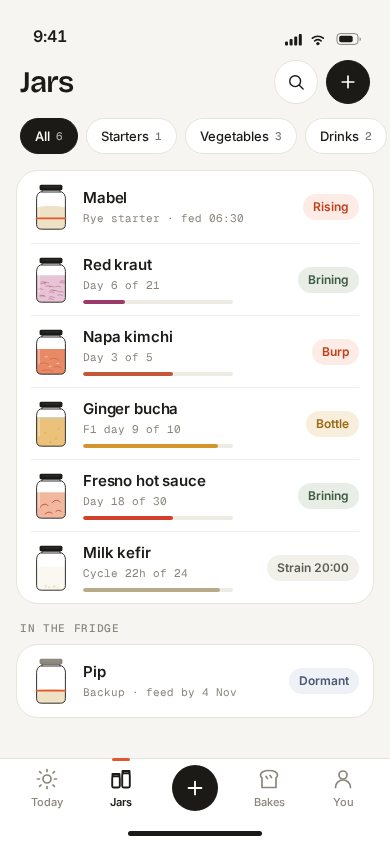
A list screen from Crock, a fermentation and sourdough starter log app template in a Minimal style. Screen 5 of 25.
Crock is a complete fermentation log: welcome, culture setup and sign in, a today home with the starter's rise, every jar on the counter, a starter page with its rise history, a feed form with ratios and grams, a live rise tracker and a peak alert, ferment batches with a day by day log, a new batch with a salt calculator, a jar photo camera, a bake journal, a bake detail, a backwards bake planner, discover and a recipe in baker's percentages, insights, a starter kit checkout with a confirmation, notifications, a Plus plan, profile and settings. Flour white and ink with a rubber band red.
| Detail | Value |
|---|---|
| Screen type | List |
| App | Crock: Fermentation and sourdough starter log |
| Category | Food |
| Design language | Minimal, light |
| Type | Bricolage Grotesque for headings, Inter for text |
| Colours | #f6f5f1 background, #ffffff surface, #1b1a17 text, #8a867c text-muted, #e4572e accent, #ffffff accent-contrast, #3f5b45 secondary, #e7e4dc border, #c8361d danger |
What this screen says
- Jars
- All 6 Starters 1 Vegetables 3 Drinks 2
- MabelRye starter · fed 06:30
- Rising
- Red krautDay 6 of 21
- Brining
- Napa kimchiDay 3 of 5
- Burp
- Ginger buchaF1 day 9 of 10
- Bottle
- Fresno hot sauceDay 18 of 30
- Milk kefirCycle 22h of 24
- Strain 20:00
- In the fridge
- PipBackup · feed by 4 Nov
- Dormant
- Today
- Bakes
- You
Around it in Crock
More list and feed screens
- Nosh Menu: Local restaurant reviews
- Buns Deals: Burger chain ordering and deals
- Slice Menu: Pizza ordering with a live tracker
- Crate Menu: Meal kits delivered weekly
- Dash Aisle: Ten minute grocery delivery
- Aisle Weekly shop: Shared grocery lists
- Menu: Scan, order and pay at the table
- Mart Weekly ad: Supermarket app with loyalty and scan and go
- Rescue Bakeries: Surprise bags of surplus food
- Omakase Reservations: Chef's counter reservations
- Lunchbox Week plan: School lunch planner for parents
- Agave Collection: Cocktails and home bar
What makes a good list screen
- Show what people need to decide. Each row should carry just enough to choose: a title, one or two details and a status. Everything else belongs on the detail screen.
- Keep rows consistent. The same information in the same place on every row lets people scan down a column instead of reading each item.
- Group with headings. Dates, categories or status headings break long lists into chunks people can skip through.
- Make common actions quick. Swipe actions, a checkbox or a heart on the row save opening the item for small tasks.
The full list screen guide and every example
Remix Crock free: describe your own app and it is drawn in this design. Or get its files from $10: Figma, React Native, SwiftUI, Flutter and HTML.