Templates · List and feed screens · Productivity app · Swarm
Swarm Completed screen
A list screen from Swarm, a torrent client app template in a Dark-first style. Screen 18 of 25.
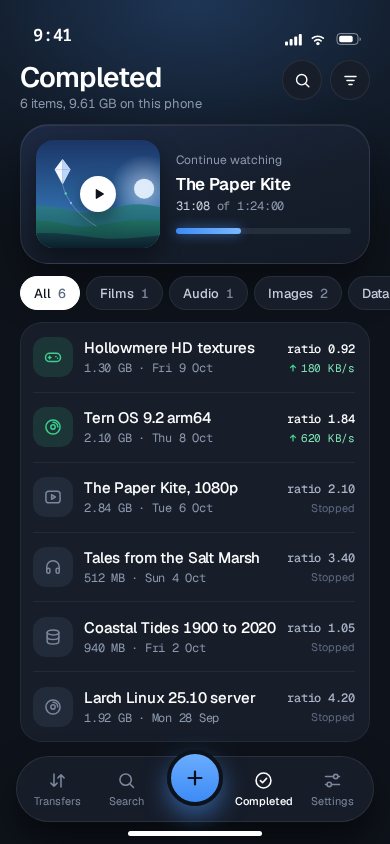
Swarm is a complete torrent client for open and public domain files: welcome, storage access, a transfers home with a live speed card, adding a torrent by magnet link, choosing files and a save location, a torrent page with files, peers, trackers and a piece map, speed history, search and results, feeds with auto download rules, a completed library with a player, schedule, speed limits, network, desktop pairing, a Pro plan and settings. Deep slate navy with download blue, seed green and amber.
| Detail | Value |
|---|---|
| Screen type | List |
| App | Swarm: Torrent client |
| Category | Productivity |
| Design language | Dark-first, dark |
| Type | Geist |
| Colours | #0e131b background, #171e2a surface, #ffffff text, #8c98ad text-muted, #4c9aff accent, #06101f accent-contrast, #3ecf8e secondary, #242d3c border, #ff6b6b danger |
What this screen says
- Completed
- 6 items, 9.61 GB on this phone
- Continue watching
- The Paper Kite31:08 of 1:24:00
- All6
- Films1
- Audio1
- Images2
- Data1
- Mods1
- Hollowmere HD textures1.30 GB · Fri 9 Oct
- ratio 0.92
- 180 KB/s
- Tern OS 9.2 arm642.10 GB · Thu 8 Oct
- ratio 1.84
- 620 KB/s
- The Paper Kite, 1080p2.84 GB · Tue 6 Oct
- ratio 2.10
- Stopped
- Tales from the Salt Marsh512 MB · Sun 4 Oct
- ratio 3.40
- Coastal Tides 1900 to 2020940 MB · Fri 2 Oct
- ratio 1.05
- Larch Linux 25.10 server1.92 GB · Mon 28 Sep
- ratio 4.20
- Transfers
- Search
- Settings
Around it in Swarm
More list and feed screens
- Glance History: Visual search with the camera
- Replay Library: Record and share screen videos
- Easel Templates: Collaborative whiteboard
- Token Requests: Two-factor codes and sign-in approvals
- Beam Transfers: Send big files
- Parchment Files: Documents, edit and share
- Lectern New deck: Slides and presenter remote
- Ringer Recents: Phone, contacts and voicemail
- Pipeline: Sales CRM on the road
- Aim Objectives: Goals and key results
- Scribe Action items: Voice memos to notes
- Inkline Inbox: Sign and send contracts
Every productivity app list screen
What makes a good list screen
- Show what people need to decide. Each row should carry just enough to choose: a title, one or two details and a status. Everything else belongs on the detail screen.
- Keep rows consistent. The same information in the same place on every row lets people scan down a column instead of reading each item.
- Group with headings. Dates, categories or status headings break long lists into chunks people can skip through.
- Make common actions quick. Swipe actions, a checkbox or a heart on the row save opening the item for small tasks.
The full list screen guide and every example
Remix Swarm free: describe your own app and it is drawn in this design. Or get its files from $10: Figma, React Native, SwiftUI, Flutter and HTML.