Templates · List and feed screens · Smart home app · Sundial
Sundial Rules screen
A list screen from Sundial, a solar panels and home battery app template in a Glass style. Screen 16 of 25.
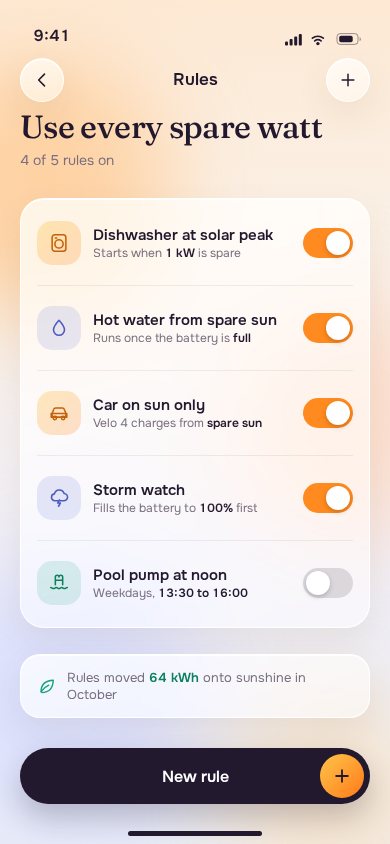
Sundial is a complete solar and home battery app: welcome, sign in and connecting the inverter hub, a today screen built around a sundial arc, a live energy flow between roof, battery, home and grid, the battery with its backup reserve and modes, a roof map of every panel and a single panel's output, a seven day sun forecast, history and savings, smart devices with solar only car charging, automation rules, grid export earnings, booking a panel clean with a local installer through to confirmation, a Plus plan, notifications, profile and settings. Apricot and lilac glass with marigold, teal and periwinkle.
| Detail | Value |
|---|---|
| Screen type | List |
| App | Sundial: Solar panels and home battery |
| Category | Smart home |
| Design language | Glass, light |
| Type | Fraunces for headings, Onest for text |
| Colours | #faf1e8 background, #ffffff surface, #23192e text, #7a6f7f text-muted, #ff8a1f accent, #23192e accent-contrast, #16a37a secondary, #6c7bd9 grid, #ffffff border, #e5484d danger |
What this screen says
- Rules
- Use every spare watt
- 4 of 5 rules on
- Dishwasher at solar peak
- Starts when 1 kW is spare
- Hot water from spare sun
- Runs once the battery is full
- Car on sun only
- Velo 4 charges from spare sun
- Storm watch
- Fills the battery to 100% first
- Pool pump at noon
- Weekdays, 13:30 to 16:00
- Rules moved 64 kWh onto sunshine in October
- New rule
Around it in Sundial
More list and feed screens
- Upkeep Calendar: Home maintenance calendar
- Kelvin Rooms: Climate and thermostat
- Glow Rooms: Light scenes and colour
- Tagged Rooms: Home inventory for insurance
- Lobby Packages: Apartment building app
- Sweep Rooms: Robot vacuum and mop
- Dusk Notifications: Smart home scenarios
- Lumen Notifications: Smart home energy
- Abode Notifications: Smart home devices
- Boxed Inventory: Book movers and plan moving day
- Meter Readings: Your energy supplier account
- Couch Episodes: TV remote, casting and watchlist
Every smart home app list screen
What makes a good list screen
- Show what people need to decide. Each row should carry just enough to choose: a title, one or two details and a status. Everything else belongs on the detail screen.
- Keep rows consistent. The same information in the same place on every row lets people scan down a column instead of reading each item.
- Group with headings. Dates, categories or status headings break long lists into chunks people can skip through.
- Make common actions quick. Swipe actions, a checkbox or a heart on the row save opening the item for small tasks.
The full list screen guide and every example
Remix Sundial free: describe your own app and it is drawn in this design. Or get its files from $10: Figma, React Native, SwiftUI, Flutter and HTML.