Templates · Form and input screens · Education app · Studyhall
Studyhall Unit test screen
A form screen from Studyhall, an education app template in a Playful style. Screen 14 of 25.
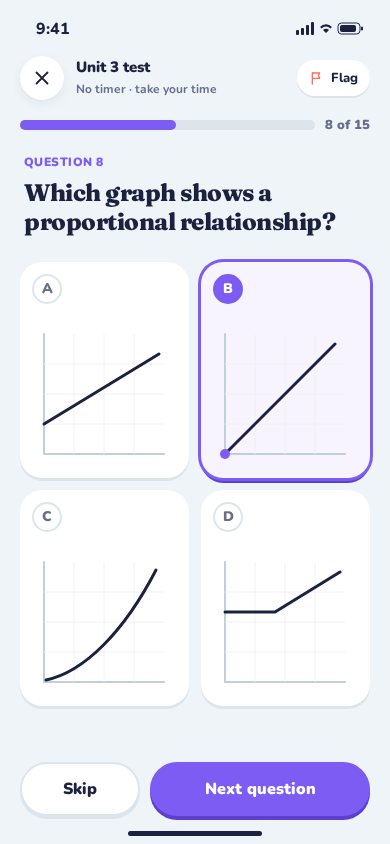
Studyhall is a complete free school learning app: welcome, grade picker and sign in, a home with what to continue and what is assigned, subjects to explore, a course and a unit with skill mastery, a video lesson with its transcript, practice with a keypad, hints and a correct answer, a level up, a unit test and its results, course mastery and weekly progress, an AI tutor that asks guiding questions, teacher assignments, search, notifications, a donation plan, profile and settings. Chalk blue and white with teal, marigold, plum and coral.
| Detail | Value |
|---|---|
| Screen type | Form |
| App | Studyhall: Free lessons and practice for school |
| Category | Education |
| Design language | Playful, light |
| Type | Fraunces for headings, Nunito for text |
| Colours | #eef4f7 background, #ffffff surface, #1b2240 text, #66708a text-muted, #0e9f97 accent, #ffffff accent-contrast, #ffb627 secondary, #dde5ec border, #ff6b5b danger |
What this screen says
- Unit 3 testNo timer · take your time
- Flag
- 8 of 15
- QUESTION 8
- Which graph shows a proportional relationship?
- Skip
- Next question
Around it in Studyhall
More form and input screens
- Zenith New observation: Night sky guide
- Chalk Quiz: Design courses
- Classroom New post: Class stream and assignments
- Tutor Filters: Book online tutors for any skill
- Leaf New note: E-books and reading
- Almanac Edit section: The free encyclopedia reader
- Tiles Share result: Daily word and number puzzles
- Stacks Renew: Borrow e-books and audiobooks from your library
- Penpal Correct: Language exchange chat
- Lexis Quiz: A word a day
- Quanta Quiz: Interactive physics lessons
- Cram New card: Exam prep and mock tests
Every education app form screen
What makes a good form screen
- Ask only what you need. Every field is a reason to stop. Remove optional fields or move them to later.
- Labels above fields. Visible labels stay readable while people type; placeholder-only labels disappear.
- Use the right keyboard and input. Number pads for amounts, email keyboards for email, pickers for dates and autofill for addresses and codes.
- Validate as people go. Show problems next to the field when people leave it, in words that say how to fix them.
The full form screen guide and every example
Remix Studyhall free: describe your own app and it is drawn in this design. Or get its files from $10: Figma, React Native, SwiftUI, Flutter and HTML.