Templates · Success and confirmation screens · Education app · Studyhall
Studyhall Test results screen
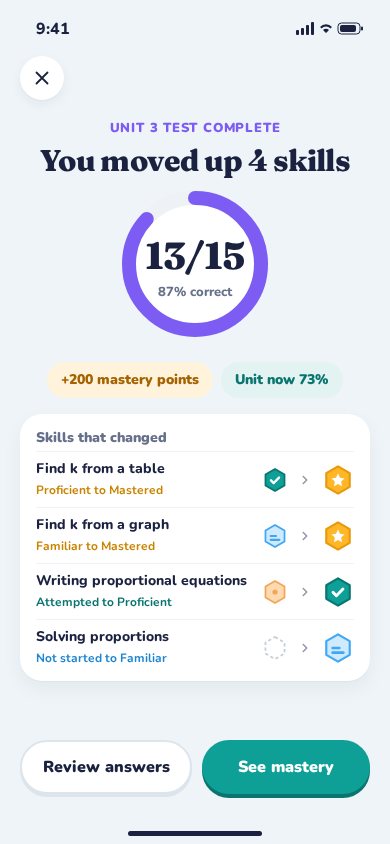
A success screen from Studyhall, an education app template in a Playful style. Screen 15 of 25.
Studyhall is a complete free school learning app: welcome, grade picker and sign in, a home with what to continue and what is assigned, subjects to explore, a course and a unit with skill mastery, a video lesson with its transcript, practice with a keypad, hints and a correct answer, a level up, a unit test and its results, course mastery and weekly progress, an AI tutor that asks guiding questions, teacher assignments, search, notifications, a donation plan, profile and settings. Chalk blue and white with teal, marigold, plum and coral.
| Detail | Value |
|---|---|
| Screen type | Success |
| App | Studyhall: Free lessons and practice for school |
| Category | Education |
| Design language | Playful, light |
| Type | Fraunces for headings, Nunito for text |
| Colours | #eef4f7 background, #ffffff surface, #1b2240 text, #66708a text-muted, #0e9f97 accent, #ffffff accent-contrast, #ffb627 secondary, #dde5ec border, #ff6b5b danger |
What this screen says
- UNIT 3 TEST COMPLETE
- You moved up 4 skills
- 13/1587% correct
- +200 mastery points Unit now 73%
- Skills that changed
- Find k from a tableProficient to Mastered
- Find k from a graphFamiliar to Mastered
- Writing proportional equationsAttempted to Proficient
- Solving proportionsNot started to Familiar
- Review answers
- See mastery
Around it in Studyhall
More success and confirmation screens
- Homeroom Handed in: School, all on one page
- Parla Lesson complete: Language learning
- Recall Session done: Flashcards and spaced repetition
- Numo Level complete: Kids maths game
- Syntax Lesson complete: Learn to code
- Tuckin Goodnight: Bedtime stories for kids
- Zenith Observation saved: Night sky guide
- Chalk Enrolled: Design courses
- Encore Subscribed: Creator courses
- Classroom Grades returned: Class stream and assignments
- Tutor Trial booked: Book online tutors for any skill
- Leaf Purchased: E-books and reading
Every education app success screen
What makes a good confirmation screen
- Confirm in the headline. "Payment sent", "Table booked for Friday at 8" or "Lesson complete" in plain words, with a clear success colour or icon.
- Repeat the key details. Amount, date, reference number or score, so people do not need to check elsewhere that the right thing happened.
- Say what happens next. When the order arrives, when the money lands, when the next lesson unlocks.
- Offer the next step. Track the order, add to calendar, share, or start the next lesson. One primary action and a way back home.
The full confirmation screen guide and every example
Remix Studyhall free: describe your own app and it is drawn in this design. Or get its files from $10: Figma, React Native, SwiftUI, Flutter and HTML.