Templates · Form and input screens · Productivity app · Stow
Stow Upload screen
A form screen from Stow, a cloud storage app template in a Minimal style. Screen 15 of 25.
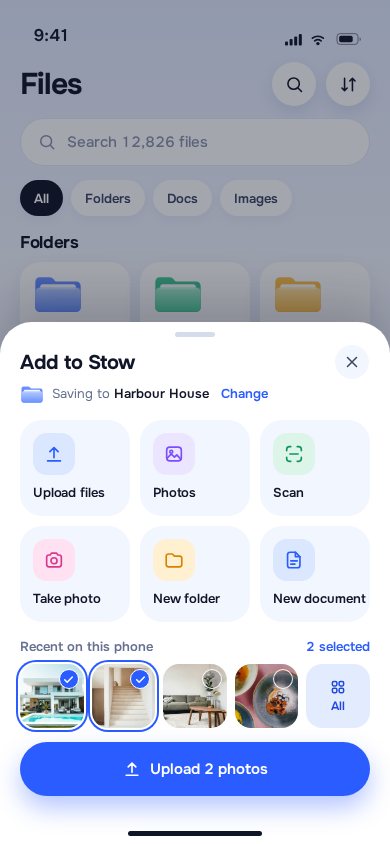
Stow is a complete cloud storage app: onboarding, sign in, a home with suggested files and storage at a glance, files in list and grid, folders, document and photo previews, file details, sharing with people and links, shared with me, starred, offline, search, uploads with a live queue, move to, document scanning, a storage breakdown with clean up, the bin, activity, plans, account and settings. Pale sky and white with cobalt blue and five file type colours.
| Detail | Value |
|---|---|
| Screen type | Form |
| App | Stow: Cloud storage |
| Category | Productivity |
| Design language | Minimal, light |
| Type | Onest |
| Colours | #f2f6ff background, #ffffff surface, #101528 text, #667091 text-muted, #2a5cff accent, #ffffff accent-contrast, #8b5cf6 secondary, #e1e8f8 border, #e5484d danger |
What this screen says
- Files
- Search 12,826 files
- AllFoldersDocsImages
- Folders
- Add to Stow
- Saving to Harbour House Change
- Upload files
- Photos
- Scan
- Take photo
- New folder
- New document
- Recent on this phone 2 selected
- All
- Upload 2 photos
Around it in Stow
More form and input screens
- Canvas New comment: Design files and comments on mobile
- Merge Review: Code, pull requests and reviews
- Query Research: AI answers with sources
- Glossa New document: Translate text, voice and camera
- Layout Edit text: Design anything from templates
- Tick Quick add: To-do lists and reminders
- Beacon Notify me: Find your devices and people
- Staffroom Request time off: HR, payslips and time off
- Slot New event type: Booking links and meeting scheduling
- Sheet Add field: Spreadsheets and databases
- Tunnel Double hop: VPN and online privacy
- Ping Report issue: Internet speed test
Every productivity app form screen
What makes a good form screen
- Ask only what you need. Every field is a reason to stop. Remove optional fields or move them to later.
- Labels above fields. Visible labels stay readable while people type; placeholder-only labels disappear.
- Use the right keyboard and input. Number pads for amounts, email keyboards for email, pickers for dates and autofill for addresses and codes.
- Validate as people go. Show problems next to the field when people leave it, in words that say how to fix them.
The full form screen guide and every example
Remix Stow free: describe your own app and it is drawn in this design. Or get its files from $10: Figma, React Native, SwiftUI, Flutter and HTML.