Templates · Settings screens · Food app · Steep
Steep Settings screen
A settings screen from Steep, a tea brewing and tasting notes app template in a Minimal style. Screen 25 of 25.
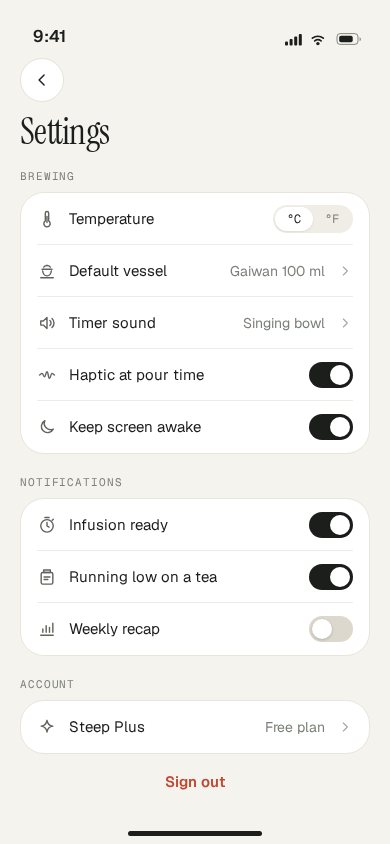
Steep is a complete tea app: welcome and brewing style, sign in, a today screen that picks up an unfinished session, a tea shelf with stock left, tea pages with an infusion plan, brew setup, a live infusion timer, tasting notes with aroma tags and sliders, a journal, session details with an infusion chart, discover, search, a tea shop with basket, checkout and confirmation, insights, a video lesson, adding a tea, a Plus plan, notifications, profile and settings. Porcelain white, ink and steeped amber, with every tea shown as its liquor colour.
| Detail | Value |
|---|---|
| Screen type | Settings |
| App | Steep: Tea brewing and tasting notes |
| Category | Food |
| Design language | Minimal, light |
| Type | Instrument Serif for headings, Geist for text |
| Colours | #f4f3ee background, #ffffff surface, #1b1e1b text, #7b8078 text-muted, #c07a2c accent, #ffffff accent-contrast, #a0601f secondary, #e8e5dc border, #c4472f danger |
What this screen says
- Settings
- Brewing
- Temperature
- °C°F
- Default vessel
- Gaiwan 100 ml
- Timer sound
- Singing bowl
- Haptic at pour time
- Keep screen awake
- Notifications
- Infusion ready
- Running low on a tea
- Weekly recap
- Account
- Steep Plus
- Free plan
- Sign out
Around it in Steep
More settings screens
- Brigade Settings: Restaurant kitchen and line ops
- Nibs Settings: Food allergy and label scanner
- Ladle Settings: Recipes and meal planning
- Pantry Settings: Grocery delivery
- Brewly Settings: Coffee ordering and loyalty
- Tabla Settings: Tables worth dressing for
- Corked Settings: Wine journal and cellar
- Crumb Settings: Neighbourhood bakery
- Tiffin Settings: Food delivery
- Courier Settings: Food delivery driver app
- Picker Settings: Grocery shopper app
- Queue Settings: Join the waitlist from anywhere
Every food app settings screen
What makes a good settings screen
- Group options into clear sections. Account, notifications, privacy, appearance and help, with headings, so people scan to the right group.
- Label settings by their effect. "Daily reminder at 8:00" is clearer than "Reminders". Add a short description under options that need one.
- Use the right control. Toggles for on and off, a row that opens a list for choices, and sliders only for ranges.
- Apply changes immediately. Most mobile settings take effect when changed, with no Save button to forget.
The full settings screen guide and every example
Remix Steep free: describe your own app and it is drawn in this design. Or get its files from $10: Figma, React Native, SwiftUI, Flutter and HTML.