Templates · Sign in and sign up screens · Finance app · Standing
Standing Create account screen
A sign in screen from Standing, a credit score and reports app template in a Minimal style. Screen 2 of 25.
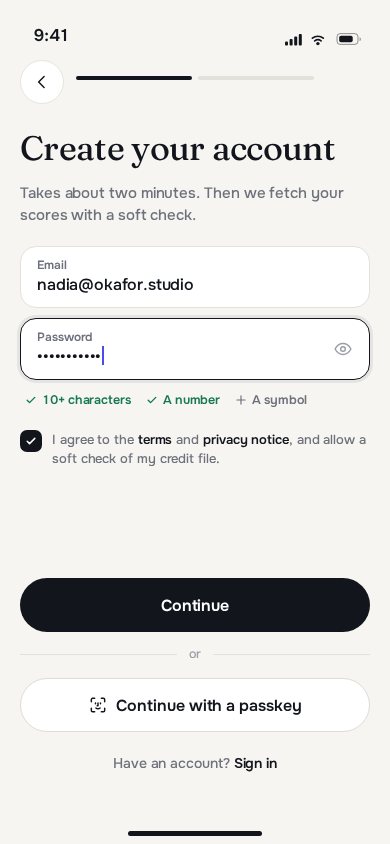
Standing is a complete credit score app: welcome, sign up and identity check, a home with the score dial and what changed, score history across two bureaus, the six score factors with card use and payment history in depth, the full report with accounts, an account page and enquiries, a dispute with confirmation, alerts with a was this you check, a score simulator, identity monitoring with a breach, matched card and loan offers clearly marked as offers with an application and a sent screen, a Plus plan, profile and settings. Paper and white with ink and a coral to green score scale.
| Detail | Value |
|---|---|
| Screen type | Sign in |
| App | Standing: Credit score and reports |
| Category | Finance |
| Design language | Minimal, light |
| Type | Fraunces for headings, Onest for text |
| Colours | #f6f5f1 background, #ffffff surface, #12151c text, #6d717b text-muted, #12151c accent, #ffffff accent-contrast, #4a4cf0 secondary, #e7e5de border, #d9442e danger |
What this screen says
- Create your account
- Takes about two minutes. Then we fetch your scores with a soft check.
- nadia@okafor.studio
- Password
- •••••••••••
- 10+ characters A number A symbol
- I agree to the terms and privacy notice, and allow a soft check of my credit file.
- Continue
- or
- Continue with a passkey
- Have an account? Sign in
Around it in Standing
More sign in and sign up screens
- Bullion Sign in: Gold and silver savings
- Wage Sign in: Get paid as you work
- Keystone Sign in: Mortgage and home loan tracker
- Rebate Sign up: Cashback card and rewards
- Aegis Sign in: Insurance policies and claims
- Till Sign in: Card reader and sales for small shops
- Strike Sign in: Options trading
- Prism Sign in: Net worth across every account
- Folio Sign in: Stocks and ETF investing
- Compound Sign in: Mutual funds and SIPs
- Halden Sign in: Premium neobank
- Billable Sign in: Time tracking and invoices, kept like a ledger
Every finance app sign in screen
What makes a good login screen
- Offer the fastest option first. Sign in with Apple, Google or a passkey takes one tap. If you support them, put them above the email form. Apple asks apps that use a third-party login like Google to also offer an equivalent privacy-focused option, such as Sign in with Apple.
- Separate sign in from sign up clearly. Use different headings and buttons, and a clear link to switch. People who already have an account should never end up creating a second one by accident.
- Use the right keyboard and autofill. Email fields should open the email keyboard and support password managers and one-time code autofill. Small details, big difference in how many people get through.
- Write errors that help. "That password doesn't match this email" is better than "Error 401". Keep what people typed so they only fix the part that was wrong.
The full login screen guide and every example
Remix Standing free: describe your own app and it is drawn in this design. Or get its files from $10: Figma, React Native, SwiftUI, Flutter and HTML.