Templates · Sign in and sign up screens · Finance app · Wage
Wage Sign in screen
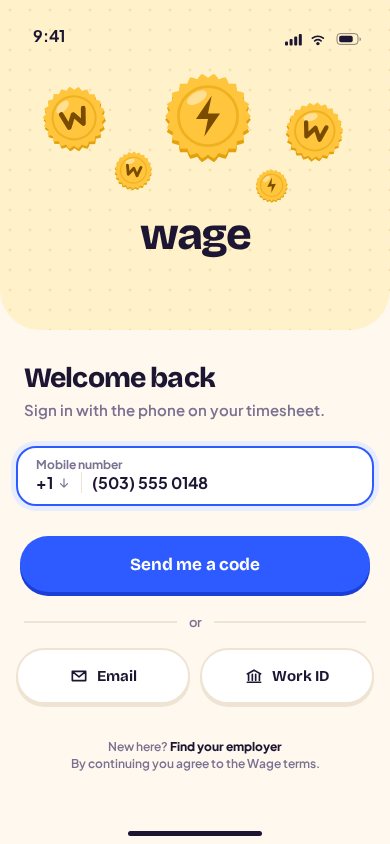
A sign in screen from Wage, a finance app template in a Playful style. Screen 3 of 25.
Wage is a complete earned wage access app for shift workers: welcome, employer search, sign in and a text code, a home with pay earned so far on an odometer counter, QR clock in, a live shift dial that earns by the minute, the week of shifts, a shift breakdown, open shifts to pick up with bonus pay, cash out with a number pad, instant or free review and a coin burst success, earnings by day, a payslip, tips, savings pots and a new pot, activity, the Wage debit card, notifications, a Wage Plus plan, profile and settings. Cream and white with electric cobalt, coin gold, mint and bubblegum pink.
| Detail | Value |
|---|---|
| Screen type | Sign in |
| App | Wage: Get paid as you work |
| Category | Finance |
| Design language | Playful, light |
| Type | Bricolage Grotesque for headings, Plus Jakarta Sans for text |
| Colours | #fff8ee background, #ffffff surface, #1c1633 text, #7a7290 text-muted, #2e5bff accent, #ffffff accent-contrast, #ffc53d secondary, #efe4d3 border, #f2483d danger |
What this screen says
- wage
- Welcome back
- Sign in with the phone on your timesheet.
- Mobile number+1 (503) 555 0148
- Send me a code
- or
- Work ID
- New here? Find your employer
- By continuing you agree to the Wage terms.
Around it in Wage
More sign in and sign up screens
- Strike Sign in: Options trading
- Prism Sign in: Net worth across every account
- Folio Sign in: Stocks and ETF investing
- Compound Sign in: Mutual funds and SIPs
- Halden Sign in: Premium neobank
- Billable Sign in: Time tracking and invoices, kept like a ledger
- Lease Sign in: Your tenancy, drawn to plan
- Claim Sign in: Expenses, filed like a till receipt
- Tally Sign in: Monthly budgeting
- Divvy Sign in: Split bills with friends
- Ticker Sign in: Stock investing
- Burrow Sign in: Shared savings pots
Every finance app sign in screen
What makes a good login screen
- Offer the fastest option first. Sign in with Apple, Google or a passkey takes one tap. If you support them, put them above the email form. Apple asks apps that use a third-party login like Google to also offer an equivalent privacy-focused option, such as Sign in with Apple.
- Separate sign in from sign up clearly. Use different headings and buttons, and a clear link to switch. People who already have an account should never end up creating a second one by accident.
- Use the right keyboard and autofill. Email fields should open the email keyboard and support password managers and one-time code autofill. Small details, big difference in how many people get through.
- Write errors that help. "That password doesn't match this email" is better than "Error 401". Keep what people typed so they only fix the part that was wrong.
The full login screen guide and every example
Remix Wage free: describe your own app and it is drawn in this design. Or get its files from $10: Figma, React Native, SwiftUI, Flutter and HTML.