Templates · Sign in and sign up screens · Finance app · Folio
Folio Sign in screen
A sign in screen from Folio, a stocks and ETF investing app template in a Minimal style. Screen 2 of 25.
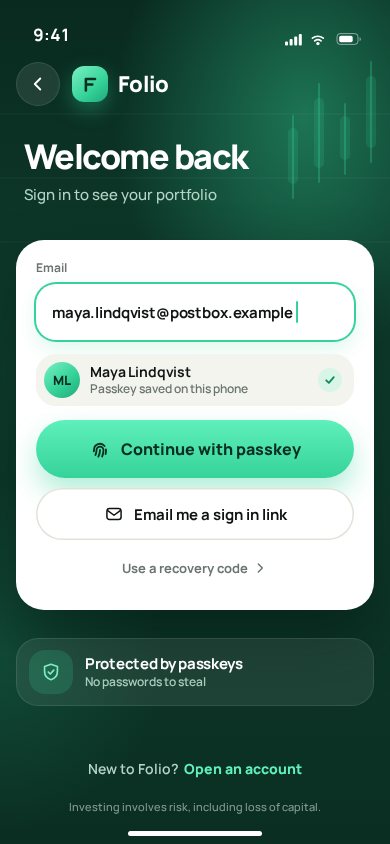
Folio is a complete investing app: welcome, sign in, identity check, funding, a portfolio home with a touchable day chart and holdings, stock and ETF pages, a candle chart, a number pad order ticket with review and confirmation, watchlist, discover with movers, sectors and themes, search, positions, orders, recurring buys, an earnings calendar, news, price alerts, transfers, statements and tax, a premium plan, account and settings. Bone and white with deep forest green, glowing mint and a coral for losses.
| Detail | Value |
|---|---|
| Screen type | Sign in |
| App | Folio: Stocks and ETF investing |
| Category | Finance |
| Design language | Minimal, light |
| Type | Manrope |
| Colours | #f3f4ee background, #ffffff surface, #0f1412 text, #6b756f text-muted, #35d39a accent, #0a2e22 accent-contrast, #0f3d2e secondary, #e6e8de border, #f0563f danger |
What this screen says
- Folio
- Welcome back
- Sign in to see your portfolio
- maya.lindqvist@postbox.example
- ML
- Maya LindqvistPasskey saved on this phone
- Continue with passkey
- Email me a sign in link
- Use a recovery code
- Protected by passkeys
- No passwords to steal
- New to Folio?Open an account
- Investing involves risk, including loss of capital.
Around it in Folio
More sign in and sign up screens
- Halden Sign in: Premium neobank
- Billable Sign in: Time tracking and invoices, kept like a ledger
- Lease Sign in: Your tenancy, drawn to plan
- Claim Sign in: Expenses, filed like a till receipt
- Tally Sign in: Monthly budgeting
- Divvy Sign in: Split bills with friends
- Ticker Sign in: Stock investing
- Burrow Sign in: Shared savings pots
- Remit Sign in: International money transfer
- Piggy Sign in: Pocket money for kids
- Settle Sign in: Bill payments and banking
- Fathom Sign in: Crypto wallet
Every finance app sign in screen
What makes a good login screen
- Offer the fastest option first. Sign in with Apple, Google or a passkey takes one tap. If you support them, put them above the email form. Apple asks apps that use a third-party login like Google to also offer an equivalent privacy-focused option, such as Sign in with Apple.
- Separate sign in from sign up clearly. Use different headings and buttons, and a clear link to switch. People who already have an account should never end up creating a second one by accident.
- Use the right keyboard and autofill. Email fields should open the email keyboard and support password managers and one-time code autofill. Small details, big difference in how many people get through.
- Write errors that help. "That password doesn't match this email" is better than "Error 401". Keep what people typed so they only fix the part that was wrong.
The full login screen guide and every example
Remix Folio free: describe your own app and it is drawn in this design. Or get its files from $10: Figma, React Native, SwiftUI, Flutter and HTML.