Templates · Form and input screens · Productivity app · Staffroom
Staffroom New expense screen
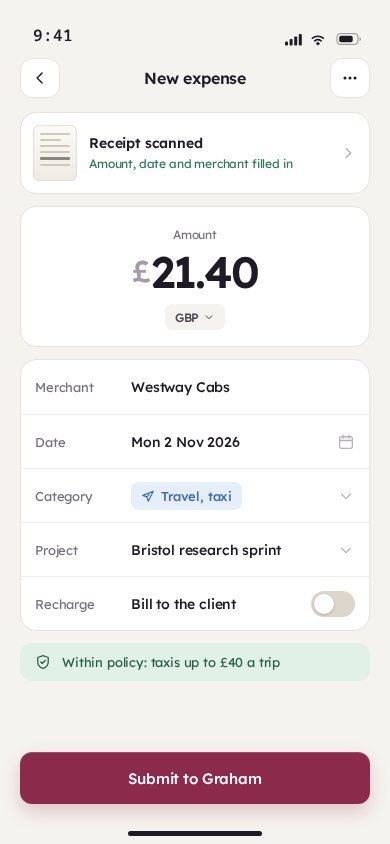
A form screen from Staffroom, a productivity app template in an Enterprise style. Screen 16 of 25.
Staffroom is a complete employee HR app: welcome, workspace sign in and a 6 digit code, a home with next payday, requests waiting and the leave balance, a manager inbox with a time off approval, time off balances, a calendar request with review and confirmation, a team absence calendar, pay with a year chart, a full UK payslip, expenses with a receipt scanner and a new claim form, benefits and a health cover plan picker, a people directory, a colleague profile, an org chart, a quarterly check in, notifications, a staff badge profile and settings. Warm stone and white with deep claret and ochre.
| Detail | Value |
|---|---|
| Screen type | Form |
| App | Staffroom: HR, payslips and time off |
| Category | Productivity |
| Design language | Enterprise, light |
| Type | Lexend |
| Colours | #f5f3ef background, #ffffff surface, #1f1b24 text, #77717d text-muted, #8b2a4a accent, #ffffff accent-contrast, #c9851b secondary, #e8e3dc border, #c4422f danger |
What this screen says
- New expense
- Receipt scannedAmount, date and merchant filled in
- Amount
- GBP
- Merchant Westway Cabs
- Date Mon 2 Nov 2026
- Category
- Travel, taxi
- Project Bristol research sprint
- Recharge Bill to the client
- Within policy: taxis up to £40 a trip
- Submit to Graham
Around it in Staffroom
More form and input screens
- Shipyard Comments: Issue tracking for product teams
- Canvas New comment: Design files and comments on mobile
- Merge Review: Code, pull requests and reviews
- Query Research: AI answers with sources
- Glossa New document: Translate text, voice and camera
- Layout Edit text: Design anything from templates
- Tick Quick add: To-do lists and reminders
- Beacon Notify me: Find your devices and people
- Slot New event type: Booking links and meeting scheduling
- Sheet Add field: Spreadsheets and databases
- Tunnel Double hop: VPN and online privacy
- Ping Report issue: Internet speed test
Every productivity app form screen
What makes a good form screen
- Ask only what you need. Every field is a reason to stop. Remove optional fields or move them to later.
- Labels above fields. Visible labels stay readable while people type; placeholder-only labels disappear.
- Use the right keyboard and input. Number pads for amounts, email keyboards for email, pickers for dates and autofill for addresses and codes.
- Validate as people go. Show problems next to the field when people leave it, in words that say how to fix them.
The full form screen guide and every example
Remix Staffroom free: describe your own app and it is drawn in this design. Or get its files from $10: Figma, React Native, SwiftUI, Flutter and HTML.