Templates · List and feed screens · Social app · Squawk
Squawk Saved screen
A list screen from Squawk, a short posts and live conversation app template in a Minimal style. Screen 20 of 25.
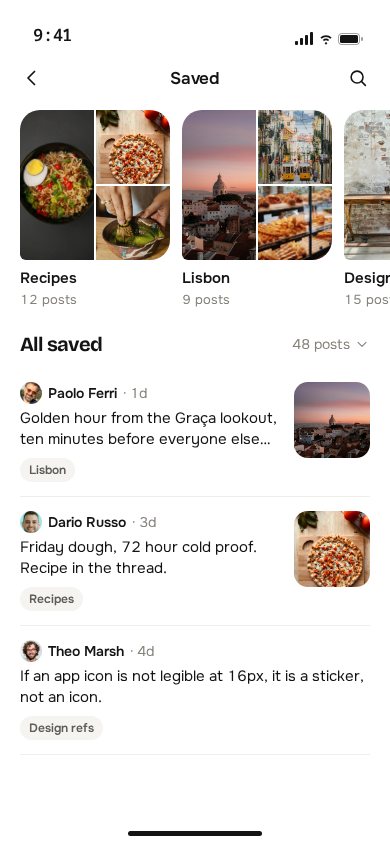
Squawk is a complete short post social app: welcome, topic picks, sign in and a code check, a For you feed with a live room strip, a post with its replies, compose with a photo and a keyboard, a full screen photo, explore with trends, search results, a trending topic with a poll, live rooms and a room with speakers, captions and listeners, messages and a chat, activity, your profile and someone else's, followers, saved folders, insights, a Plus plan with checkout and confirmation, and settings. White and warm stone with ink and one vermillion accent.
| Detail | Value |
|---|---|
| Screen type | List |
| App | Squawk: Short posts and live conversation |
| Category | Social |
| Design language | Minimal, light |
| Type | Bricolage Grotesque for headings, Onest for text |
| Colours | #ffffff background, #f5f4f0 surface, #141414 text, #85827a text-muted, #ff5a2c accent, #ffffff accent-contrast, #fff1eb secondary, #efeee9 border, #e2461b danger |
What this screen says
- Saved
- Recipes
- 12 posts
- Lisbon
- 9 posts
- Design refs
- 15 posts
- All saved48 posts
- Paolo Ferri· 1d
- Golden hour from the Graça lookout, ten minutes before everyone else showed up.
- Dario Russo· 3d
- Friday dough, 72 hour cold proof. Recipe in the thread.
- Theo Marsh· 4d
- If an app icon is not legible at 16px, it is a sticker, not an icon.
Around it in Squawk
More list and feed screens
- Commons Friends: Friends, groups and events
- Tether History: Family location and safety
- Facet Circles: Video calls with family and friends
- Stoop Free stuff: Neighbourhood noticeboard
- Aura Circles: Moods with close friends
- Kindly My shifts: Volunteering near you
- Cohort Mentors: Alumni and mentor network
- Kin Moments: Private family circle
- Confetti Gift list: Party invites and RSVPs
- Ripple Replies: Voice notes social
- Duo Calendar: An app for two
- Soapbox Takes: Weekly debates and polls
What makes a good list screen
- Show what people need to decide. Each row should carry just enough to choose: a title, one or two details and a status. Everything else belongs on the detail screen.
- Keep rows consistent. The same information in the same place on every row lets people scan down a column instead of reading each item.
- Group with headings. Dates, categories or status headings break long lists into chunks people can skip through.
- Make common actions quick. Swipe actions, a checkbox or a heart on the row save opening the item for small tasks.
The full list screen guide and every example
Remix Squawk free: describe your own app and it is drawn in this design. Or get its files from $10: Figma, React Native, SwiftUI, Flutter and HTML.