Templates · Onboarding screens · Social app · Soapbox
Soapbox Pick topics screen
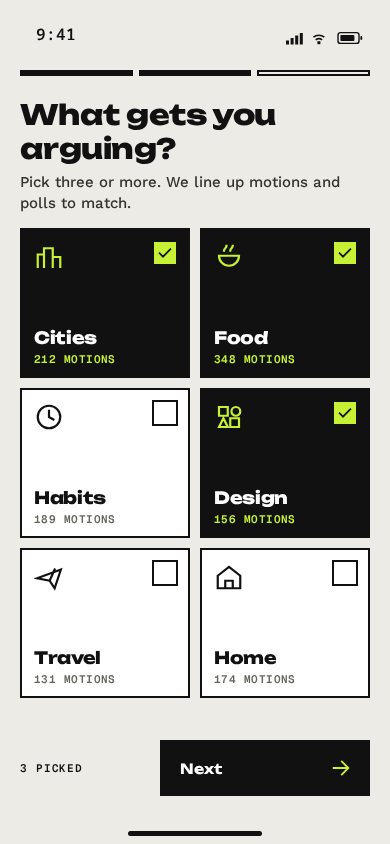
An onboarding screen from Soapbox, a weekly debates and polls app template in a Brutalist style. Screen 2 of 25.
Soapbox is a complete weekly debate and poll app: welcome, picking topics, sign in, a home with this week's motion and its live split, the motion in full, takes from both sides with rebuttals, writing a take and getting on the box, a live Friday floor round, quick polls with results, making a poll, the Sunday verdict with a swing chart, your record, the archive, explore and topics, proposing and ranking next week's motion, notifications, a Loud plan with checkout, profile and settings. Concrete grey, ink, hot pink and acid lime.
| Detail | Value |
|---|---|
| Screen type | Onboarding |
| App | Soapbox: Weekly debates and polls |
| Category | Social |
| Design language | Brutalist, light |
| Type | Unbounded for headings, Work Sans for text |
| Colours | #ecebe5 background, #ffffff surface, #111111 text, #66655e text-muted, #ff3ea5 accent, #111111 accent-contrast, #c6f135 secondary, #111111 border, #ff3ea5 danger |
What this screen says
- What gets you arguing?
- Pick three or more. We line up motions and polls to match.
- Cities212 MOTIONS
- Food348 MOTIONS
- Habits189 MOTIONS
- Design156 MOTIONS
- Travel131 MOTIONS
- Home174 MOTIONS
- 3 PICKED
- Next
Around it in Soapbox
More onboarding screens
- Spark Welcome: Swipe dating
- Candid Welcome: One real photo a day
- Blink Welcome: Camera chat and stories
- Cipher Welcome: Encrypted private messenger
- Commons Welcome: Friends, groups and events
- Tether Welcome: Family location and safety
- Facet Welcome: Video calls with family and friends
- Stoop Welcome: Neighbourhood noticeboard
- Aura Welcome: Moods with close friends
- Kindly Welcome: Volunteering near you
- Cohort Welcome: Alumni and mentor network
- Kin Welcome: Private family circle
Every social app onboarding screen
What makes a good onboarding screen
- One idea per screen. Each screen should say one thing in a headline people can read in a second. If a screen needs a paragraph, it is doing too much.
- Personalise with a purpose. Ask a question only if the answer changes what people see next, like a goal, a level or an interest. Then show that the answer mattered.
- Explain permissions before asking. Show your own screen saying why you need notifications, location or the camera before the system prompt. People who understand the reason are more likely to allow it.
- Let people skip. A visible skip or "I'll do this later" respects returning users and the impatient. Make sure skipping still lands them somewhere useful.
The full onboarding screen guide and every example
Remix Soapbox free: describe your own app and it is drawn in this design. Or get its files from $10: Figma, React Native, SwiftUI, Flutter and HTML.