Templates · Profile screens · Social app · Snoot
Snoot Profile screen
A profile screen from Snoot, a social app for pets app template in a Dark-first style. Screen 24 of 25.
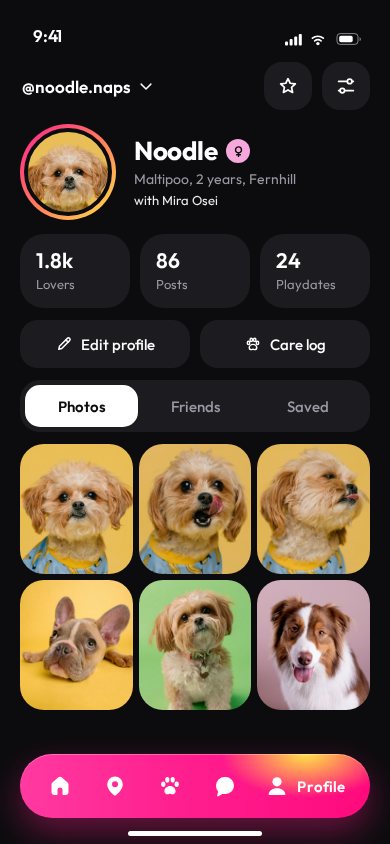
Snoot is a complete social app for pets: onboarding, sign in, adding a pet, a photo feed with stories, posts and comments, an explore screen for pets, parks, vets, food and schools, a dark map with a glowing route, place and pet profiles, playdates from plan to confirmation, messages, notifications, pet stats, a care log, a paid plan, profile and settings. Black and charcoal with hot pink, a yellow glow and candy pastels.
| Detail | Value |
|---|---|
| Screen type | Profile |
| App | Snoot: Social app for pets |
| Category | Social |
| Design language | Dark-first, dark |
| Type | Outfit |
| Colours | #0c0c0e background, #1c1c20 surface, #ffffff text, #9a9aa6 text-muted, #ff1f8f accent, #ffffff accent-contrast, #ffe24a secondary, #2c2c32 border, #ff5a5a danger |
What this screen says
- @noodle.naps
- Noodle
- Maltipoo, 2 years, Fernhill with Mira Osei
- 1.8k
- Lovers
- Posts
- Playdates
- Edit profile
- Care log
- Photos
- Friends
- Saved
- Profile
Around it in Snoot
More profile screens
- Huddle Profile: Interest groups and meetups
- Glade Creator: Photo and clip social network
- Onair Host: Live streaming
- Drift Profile: Reels and voice rooms
- Glitz Member: Party live streaming
- Hearth Contact: Messenger for trips and circles
- Chirp Profile: Messenger with file sharing
- Banter Profile: Live messenger
- Natter Contact: Minimal messenger
- Nearly Profile: Dating by crossed paths
- Linkup Profile: Professional network and jobs
- Quorum Profile: Questions and expert answers
Every social app profile screen
What makes a good profile screen
- Lead with identity. Photo, name and one line about the person at the top. It confirms whose profile this is.
- Show meaningful stats. Two to four numbers that matter in this app, like workouts, followers, books read or streak.
- Make editing obvious for the owner. An Edit profile button near the top, shown only on your own profile.
- Organise content with tabs. Posts, activity, saved or achievements as tabs keep a long profile tidy.
The full profile screen guide and every example
Remix Snoot free: describe your own app and it is drawn in this design. Or get its files from $10: Figma, React Native, SwiftUI, Flutter and HTML.