Templates · Form and input screens · Social app · Snoot
Snoot New post screen
A form screen from Snoot, a social app for pets app template in a Dark-first style. Screen 8 of 25.
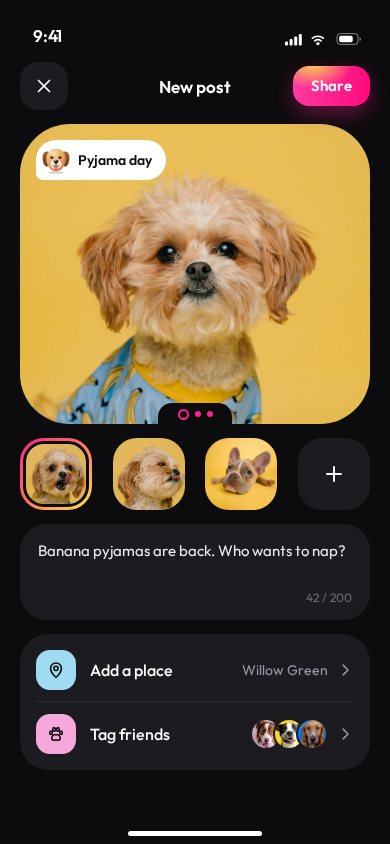
Snoot is a complete social app for pets: onboarding, sign in, adding a pet, a photo feed with stories, posts and comments, an explore screen for pets, parks, vets, food and schools, a dark map with a glowing route, place and pet profiles, playdates from plan to confirmation, messages, notifications, pet stats, a care log, a paid plan, profile and settings. Black and charcoal with hot pink, a yellow glow and candy pastels.
| Detail | Value |
|---|---|
| Screen type | Form |
| App | Snoot: Social app for pets |
| Category | Social |
| Design language | Dark-first, dark |
| Type | Outfit |
| Colours | #0c0c0e background, #1c1c20 surface, #ffffff text, #9a9aa6 text-muted, #ff1f8f accent, #ffffff accent-contrast, #ffe24a secondary, #2c2c32 border, #ff5a5a danger |
What this screen says
- New post
- Share
- Pyjama day
- Banana pyjamas are back. Who wants to nap?42 / 200
- Add a place
- Willow Green
- Tag friends
Around it in Snoot
More form and input screens
- Banter Set up profile: Live messenger
- Natter New contact: Minimal messenger
- Nearly About you: Dating by crossed paths
- Linkup New post: Professional network and jobs
- Quorum Write answer: Questions and expert answers
- Backer New post: Support creators with memberships
- Pledge Add-ons: Back creative projects
- Civic Pin location: Report issues and city services
- Guild Create server: Community servers with voice and text chat
- Parrot Your profile: Private messaging, groups and calls
- Carrier New channel: Cloud messaging with channels
- Vista New post: Photos, stories and reels
What makes a good form screen
- Ask only what you need. Every field is a reason to stop. Remove optional fields or move them to later.
- Labels above fields. Visible labels stay readable while people type; placeholder-only labels disappear.
- Use the right keyboard and input. Number pads for amounts, email keyboards for email, pickers for dates and autofill for addresses and codes.
- Validate as people go. Show problems next to the field when people leave it, in words that say how to fix them.
The full form screen guide and every example
Remix Snoot free: describe your own app and it is drawn in this design. Or get its files from $10: Figma, React Native, SwiftUI, Flutter and HTML.