Templates · Form and input screens · Social app · Vista
Vista New post screen
A form screen from Vista, a social app template in a Minimal style. Screen 14 of 25.
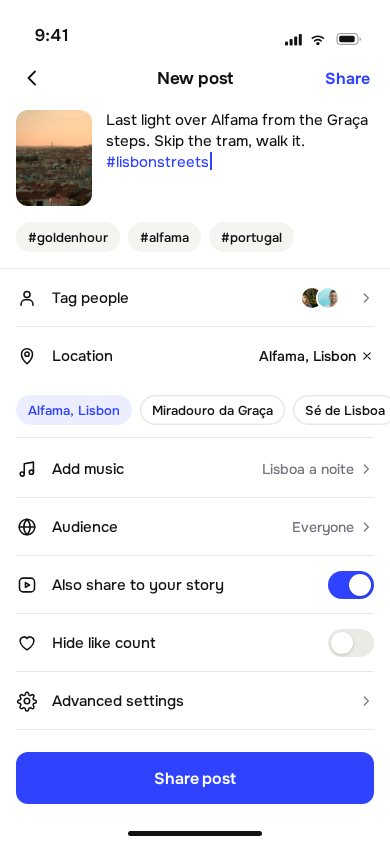
Vista is a complete photo, stories and reels app: welcome, interests and sign in, a home feed with segmented story rings and inset rounded posts, a story viewer, a post with its comments, explore with a mosaic grid, search, a place page with a map, full screen reels, a story camera, filters, a new post form with a shared confirmation, boosting a post with a budget and checkout, direct messages with notes and a chat, activity, your profile and a creator profile, insights, saved collections, a Plus plan and settings. White and ink with one ultramarine accent, a sun yellow close circle and an editorial serif.
| Detail | Value |
|---|---|
| Screen type | Form |
| App | Vista: Photos, stories and reels |
| Category | Social |
| Design language | Minimal, light |
| Type | Instrument Serif for headings, Onest for text |
| Colours | #ffffff background, #f4f4f1 surface, #111214 text, #73767c text-muted, #2f43ff accent, #ffffff accent-contrast, #ffb020 secondary, #e8e8e3 border, #f2445c danger |
What this screen says
- New post
- Share
- Last light over Alfama from the Graça steps. Skip the tram, walk it. #lisbonstreets
- #goldenhour #alfama #portugal
- Tag people
- Location Alfama, Lisbon
- Alfama, Lisbon Miradouro da Graça Sé de Lisboa
- Add music Lisboa a noite
- Audience Everyone
- Also share to your story
- Hide like count
- Advanced settings
- Share post
Around it in Vista
More form and input screens
- Flick Share: Short video feed
- Squawk Compose: Short posts and live conversation
- Agora Reply: Communities, threads and votes
- Spark About you: Swipe dating
- Candid Review: One real photo a day
- Blink Send to: Camera chat and stories
- Cipher Disappearing messages: Encrypted private messenger
- Commons New post: Friends, groups and events
- Tether Join circle: Family location and safety
- Facet Call link: Video calls with family and friends
- Stoop New post: Neighbourhood noticeboard
- Aura Drop a mood: Moods with close friends
What makes a good form screen
- Ask only what you need. Every field is a reason to stop. Remove optional fields or move them to later.
- Labels above fields. Visible labels stay readable while people type; placeholder-only labels disappear.
- Use the right keyboard and input. Number pads for amounts, email keyboards for email, pickers for dates and autofill for addresses and codes.
- Validate as people go. Show problems next to the field when people leave it, in words that say how to fix them.
The full form screen guide and every example
Remix Vista free: describe your own app and it is drawn in this design. Or get its files from $10: Figma, React Native, SwiftUI, Flutter and HTML.