Templates · Form and input screens · Food app · Slice
Slice Build your pizza screen
A form screen from Slice, a food app template in a Neubrutalism style. Screen 10 of 25.
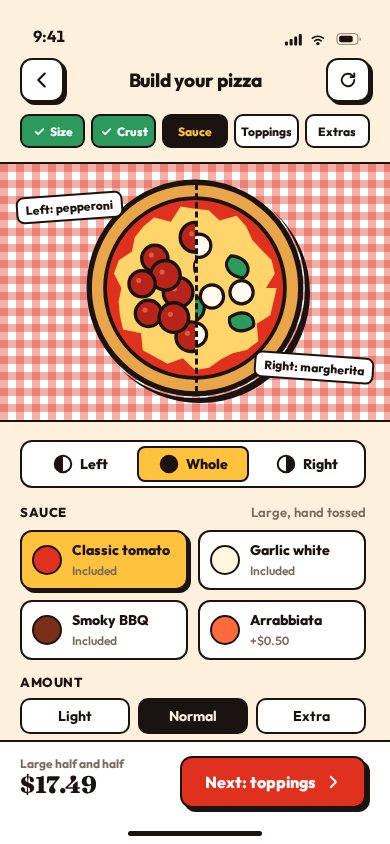
Slice is a complete pizza ordering app: welcome, sign in and a code, a home with the live order and tonight's deals, delivery or carryout with a store finder, the menu, search, a pizza page, a half and half builder with crust, size and sauce, toppings, deals and a deal builder, cart, checkout, payment, an order placed screen, a slice by slice live tracker, the driver on a map, past orders, rewards, a delivery pass, notifications, profile and settings. Crust cream, tomato red, cheese yellow and ink, with red gingham.
| Detail | Value |
|---|---|
| Screen type | Form |
| App | Slice: Pizza ordering with a live tracker |
| Category | Food |
| Design language | Neubrutalism, light |
| Type | Fraunces for headings, Outfit for text |
| Colours | #fdf0dc background, #ffffff surface, #1b1310 text, #7a6a5c text-muted, #e0301e accent, #ffffff accent-contrast, #ffc23d secondary, #1b1310 border, #2c9a5c success, #e0301e danger |
What this screen says
- Build your pizza
- Size Crust Sauce Toppings Extras
- Left: pepperoni Right: margherita
- Left
- Whole
- Right
- SauceLarge, hand tossed
- Classic tomatoIncluded
- Garlic whiteIncluded
- Smoky BBQIncluded
- Arrabbiata+$0.50
- Amount
- Light Normal Extra
- Large half and half$17.49
- Next: toppings
Around it in Slice
More form and input screens
- Courier Chat: Food delivery driver app
- Picker Weigh: Grocery shopper app
- Queue Party size: Join the waitlist from anywhere
- Nosh Write a review: Local restaurant reviews
- Buns Customize: Burger chain ordering and deals
- Crate Rate meal: Meal kits delivered weekly
- Dash Address: Ten minute grocery delivery
- Aisle order: Shared grocery lists
- Menu Options: Scan, order and pay at the table
- Mart Pickup slot: Supermarket app with loyalty and scan and go
- Rescue Set location: Surprise bags of surplus food
- Omakase Guests and notes: Chef's counter reservations
What makes a good form screen
- Ask only what you need. Every field is a reason to stop. Remove optional fields or move them to later.
- Labels above fields. Visible labels stay readable while people type; placeholder-only labels disappear.
- Use the right keyboard and input. Number pads for amounts, email keyboards for email, pickers for dates and autofill for addresses and codes.
- Validate as people go. Show problems next to the field when people leave it, in words that say how to fix them.
The full form screen guide and every example
Remix Slice free: describe your own app and it is drawn in this design. Or get its files from $10: Figma, React Native, SwiftUI, Flutter and HTML.