Templates · Form and input screens · Food app · Crate
Crate Rate meal screen
A form screen from Crate, a meal kits delivered weekly app template in a Minimal style. Screen 16 of 25.
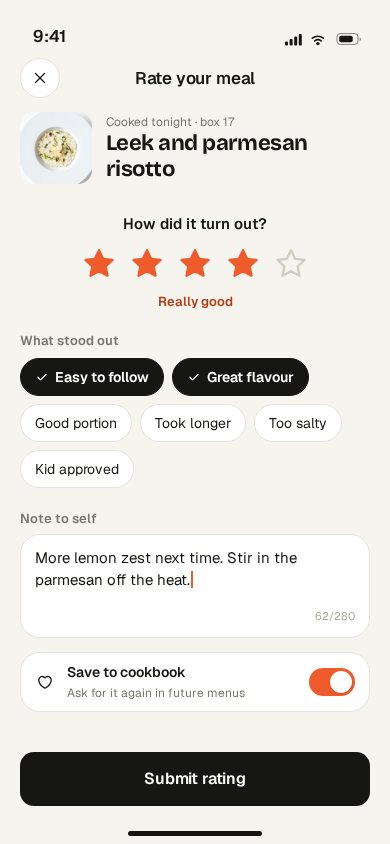
Crate is a complete meal kit app: welcome, plan setup and sign up, a home with the next box and its pick progress, the weekly menu with filters, search, a recipe page, a market for extras, the box review, checkout with a delivery window, a confirmation, live delivery tracking, upcoming weeks with skip, what is in the bag, step by step cook mode, rating, a cookbook, insights, Crate Plus, notifications, taste preferences, delivery address, help with a missing item, profile and settings. Paper and white with ink black, persimmon and kraft brown.
| Detail | Value |
|---|---|
| Screen type | Form |
| App | Crate: Meal kits delivered weekly |
| Category | Food |
| Design language | Minimal, light |
| Type | Bricolage Grotesque for headings, Geist for text |
| Colours | #f5f4ef background, #ffffff surface, #161712 text, #77776d text-muted, #ef5b2b accent, #ffffff accent-contrast, #d9c29b secondary, #e6e4db border, #d6342a danger |
What this screen says
- Rate your meal
- Cooked tonight · box 17
- Leek and parmesan risotto
- How did it turn out?
- Really good
- What stood out
- Easy to follow Great flavour Good portion Took longer Too salty Kid approved
- Note to self
- More lemon zest next time. Stir in the parmesan off the heat. 62/280
- Save to cookbookAsk for it again in future menus
- Submit rating
Around it in Crate
More form and input screens
- Tabla Filters: Tables worth dressing for
- Corked Tasting note: Wine journal and cellar
- Crumb Build a cake: Neighbourhood bakery
- Tiffin Customize: Food delivery
- Courier Chat: Food delivery driver app
- Picker Weigh: Grocery shopper app
- Queue Party size: Join the waitlist from anywhere
- Nosh Write a review: Local restaurant reviews
- Buns Customize: Burger chain ordering and deals
- Slice Order type: Pizza ordering with a live tracker
- Dash Address: Ten minute grocery delivery
- Aisle order: Shared grocery lists
What makes a good form screen
- Ask only what you need. Every field is a reason to stop. Remove optional fields or move them to later.
- Labels above fields. Visible labels stay readable while people type; placeholder-only labels disappear.
- Use the right keyboard and input. Number pads for amounts, email keyboards for email, pickers for dates and autofill for addresses and codes.
- Validate as people go. Show problems next to the field when people leave it, in words that say how to fix them.
The full form screen guide and every example
Remix Crate free: describe your own app and it is drawn in this design. Or get its files from $10: Figma, React Native, SwiftUI, Flutter and HTML.