Templates · Player, camera and editor screens · Education app · Skim
Skim Reader screen
A media screen from Skim, a speed reading trainer app template in a Minimal style. Screen 9 of 25.
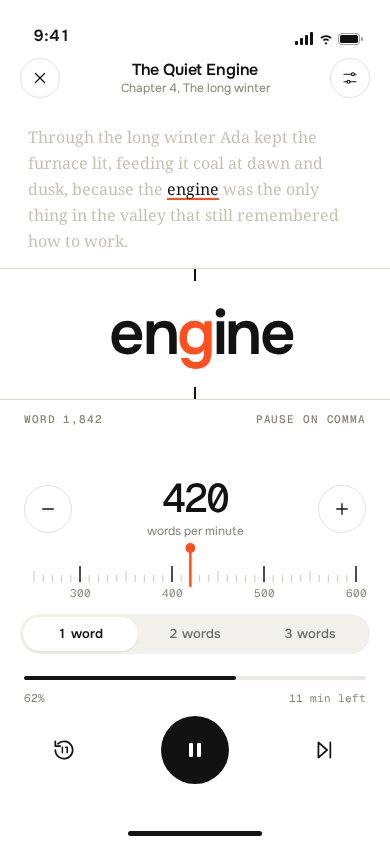
Skim is a complete speed reading trainer: welcome, a baseline reading test, a goal picker and sign up, a today plan, library, discover, a book page, a one word at a time reader, a guided pacer, a comprehension quiz and session results, drills with a live Schulte table, a 21 day course with a lesson, progress and a weekly report, adding your own text, a Pro plan with checkout, notifications, profile and settings. Paper, ink and white with a single vermilion focus letter and a highlighter yellow.
| Detail | Value |
|---|---|
| Screen type | Media |
| App | Skim: Speed reading trainer |
| Category | Education |
| Design language | Minimal, light |
| Type | Geist Mono for headings, Onest for text |
| Colours | #f4f3ef background, #ffffff surface, #121212 text, #86837b text-muted, #ff4f1f accent, #ffffff accent-contrast, #ffe14d secondary, #e3e1da border, #d93a2b danger |
What this screen says
- The Quiet Engine
- Chapter 4, The long winter
- Through the long winter Ada kept the furnace lit, feeding it coal at dawn and dusk, because the engine was the only...
- en gine
- Word 1,842 Pause on comma
- 420words per minute
- 1 word 2 words 3 words
- 62% 11 min left
Around it in Skim
More player, camera and editor screens
- Wren Read along: Early reading for kids
- Proof Scan: Maths tutor that shows its working
- Terra Flag quiz: Geography and flags quiz
- Parla Pick the word: Language learning
- Recall Study: Flashcards and spaced repetition
- Numo Question: Kids maths game
- Syntax Lesson: Learn to code
- Tuckin Reader: Bedtime stories for kids
- Zenith Sky map: Night sky guide
- Chalk Lesson: Design courses
- Encore Lesson: Creator courses
- Classroom Scan pages: Class stream and assignments
Every education app media screen
What makes a good media player screen
- Content takes the space. Artwork, video or the camera view should fill most of the screen.
- Primary controls in the thumb zone. Play and pause, the shutter or the main tool, large and low on the screen.
- Show progress and position. A scrubber with elapsed and remaining time, or the step in a lesson.
- Hide secondary controls until needed. Lyrics, queue, filters and advanced tools can live behind a tap or a swipe.
The full media player screen guide and every example
Remix Skim free: describe your own app and it is drawn in this design. Or get its files from $10: Figma, React Native, SwiftUI, Flutter and HTML.