Templates · List and feed screens · Lifestyle app · Sillage
Sillage Notifications screen
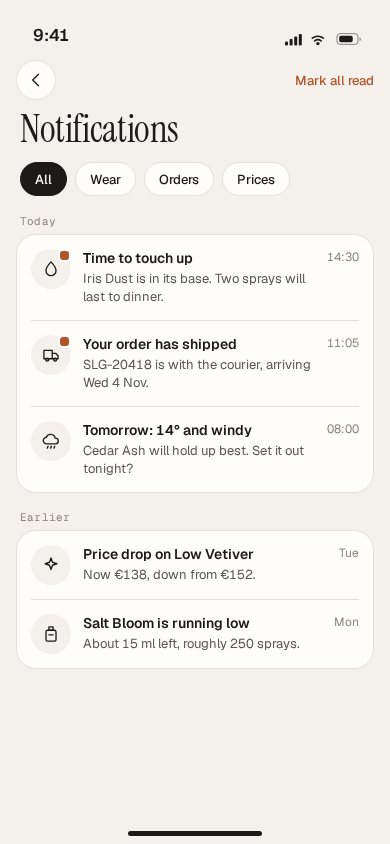
A list screen from Sillage, a fragrance wardrobe app template in a Minimal style. Screen 22 of 25.
Sillage is a complete fragrance wardrobe: welcome and a scent profile, sign in, a weather aware pick for today, the wardrobe shelf, fragrance pages with a note pyramid, ingredient notes, a live wear tracker with a top, heart and base curve, a wear log and a calendar diary, discover, search, perfume houses, a bottle scanner, adding a bottle with its fill level, layering, insights, discovery sets with a bag and an order confirmation, a wishlist, notifications, Sillage Plus, profile and settings. Vellum, ivory and ink with one burnt amber accent.
| Detail | Value |
|---|---|
| Screen type | List |
| App | Sillage: Fragrance wardrobe |
| Category | Lifestyle |
| Design language | Minimal, light |
| Type | Instrument Serif for headings, Geist for text |
| Colours | #f4f1ec background, #fffdfa surface, #1d1b18 text, #8c857b text-muted, #b4532a accent, #fffdfa accent-contrast, #6f7d5c secondary, #e6e0d6 border, #c2412d danger |
What this screen says
- Mark all read
- Notifications
- All Wear Orders Prices
- Today
- Time to touch up
- Iris Dust is in its base. Two sprays will last to dinner.
- Your order has shipped
- SLG-20418 is with the courier, arriving Wed 4 Nov.
- Tomorrow: 14° and windy
- Cedar Ash will hold up best. Set it out tonight?
- Earlier
- Price drop on Low Vetiver
- Now €138, down from €152.
- Tue
- Salt Bloom is running low
- About 15 ml left, roughly 250 sprays.
- Mon
Around it in Sillage
More list and feed screens
- Stub Listings: Fan to fan ticket resale
- Trove Boards: Visual ideas and boards
- Vidi Comments: Video platform for creators
- Roll Albums: Photo library and backups
- Splice Add media: Video editor for short clips
- Blush Lipstick: Beauty and makeup shopping
- Flatpack Room: Furniture store with room previews
- Column Comments: Newsletters and independent writers
- Fetch Sitters: Dog walkers and pet sitters
- Forecourt Results: Buy and sell used cars
- Tower Bills: Mobile plan, data and bills
- Haul Flash sale: Bargain fashion and finds
Every lifestyle app list screen
What makes a good list screen
- Show what people need to decide. Each row should carry just enough to choose: a title, one or two details and a status. Everything else belongs on the detail screen.
- Keep rows consistent. The same information in the same place on every row lets people scan down a column instead of reading each item.
- Group with headings. Dates, categories or status headings break long lists into chunks people can skip through.
- Make common actions quick. Swipe actions, a checkbox or a heart on the row save opening the item for small tasks.
The full list screen guide and every example
Remix Sillage free: describe your own app and it is drawn in this design. Or get its files from $10: Figma, React Native, SwiftUI, Flutter and HTML.