Templates · List and feed screens · Fitness app · Segment
Segment Routes screen
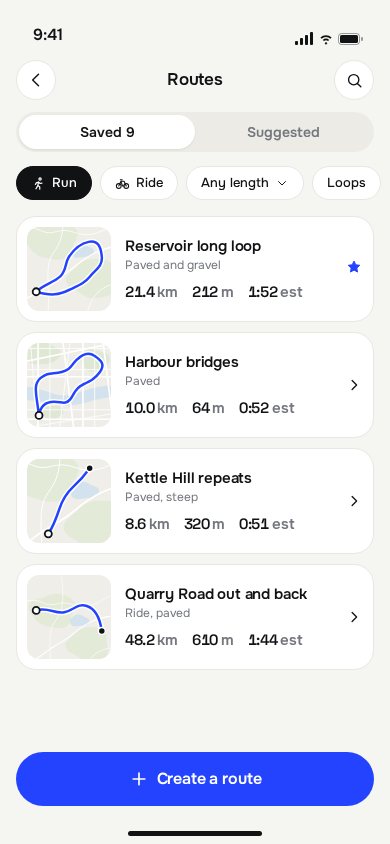
A list screen from Segment, a runs and rides with friends app template in a Minimal style. Screen 11 of 25.
Segment is a complete social running and riding app: welcome, sports and weekly goal, sign in, a friends feed with route maps, an activity with splits and segments, cheers and comments, a route replay, segment leaderboards, a segment map, search, saved routes and a route planner, recording with live stats and segment alerts, saving a run and its PRs, progress, clubs, a club page, joining a group run, challenges, notifications, a Plus plan, profile and settings. Paper and white with ink, cobalt and a chartreuse highlight.
| Detail | Value |
|---|---|
| Screen type | List |
| App | Segment: Runs and rides with friends |
| Category | Health and fitness |
| Design language | Minimal, light |
| Type | Space Grotesk for headings, Onest for text |
| Colours | #f5f5f2 background, #ffffff surface, #111214 text, #74777e text-muted, #2443ff accent, #ffffff accent-contrast, #d6f25c secondary, #e8e7e2 border, #ef4a3c danger |
What this screen says
- Routes
- Saved 9 Suggested
- Run Ride Any length Loops
- Reservoir long loopPaved and gravel
- 21.4km 212m 1:52est
- Harbour bridgesPaved
- 10.0km 64m 0:52est
- Kettle Hill repeatsPaved, steep
- 8.6km 320m 0:51est
- Quarry Road out and backRide, paved
- 48.2km 610m 1:44est
- Create a route
Around it in Segment
More list and feed screens
- Tabata History: HIIT interval timer
- Jab History: Boxing workouts with a smart bag
- Exhale History: Breathwork sessions
- Bump Weeks: Pregnancy week by week
- Locker Timetable: Gym membership and class booking
- Morsel Saved meals: AI calorie tracker
- Dew Routine: AI skin scan and routine
- Cradle Day: Baby tracker
- Medly Visits: Doctor on call
- Donor Donations: Blood donation, counted drop by drop
- Unfold Notifications: Yoga and stretching
- Kilo History: Strength training log
What makes a good list screen
- Show what people need to decide. Each row should carry just enough to choose: a title, one or two details and a status. Everything else belongs on the detail screen.
- Keep rows consistent. The same information in the same place on every row lets people scan down a column instead of reading each item.
- Group with headings. Dates, categories or status headings break long lists into chunks people can skip through.
- Make common actions quick. Swipe actions, a checkbox or a heart on the row save opening the item for small tasks.
The full list screen guide and every example
Remix Segment free: describe your own app and it is drawn in this design. Or get its files from $10: Figma, React Native, SwiftUI, Flutter and HTML.