Templates · List and feed screens · Fitness app · Morsel
Morsel Saved meals screen
A list screen from Morsel, an AI calorie tracker app template in a Minimal style. Screen 17 of 25.
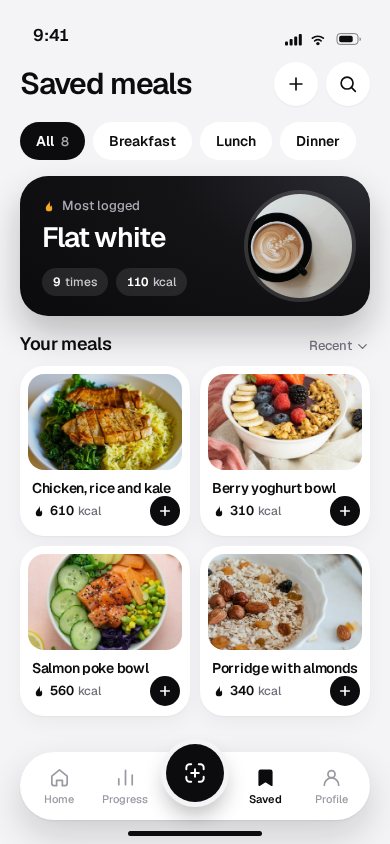
Morsel is a complete photo calorie tracker: a quiz onboarding that builds a daily plan, a paywall with a trial timeline, a home with the calories left ring and macro rings, a camera scan with detection labels on the plate, an editable result, barcode and describe a meal, saved meals, food search, progress with weight and weekly reports, streaks, reminders and settings. Soft grey and white with near black cards and coral, amber and blue macros.
| Detail | Value |
|---|---|
| Screen type | List |
| App | Morsel: AI calorie tracker |
| Category | Health and fitness |
| Design language | Minimal, light |
| Type | Geist |
| Colours | #f4f4f6 background, #ffffff surface, #0c0c0e text, #6e6e78 text-muted, #0c0c0e accent, #ffffff accent-contrast, #f26b5b secondary, #e6e6ea border, #e5484d danger |
What this screen says
- Saved meals
- All8 Breakfast Lunch Dinner
- Most logged
- Flat white
- 9 times 110 kcal
- Your mealsRecent
- Chicken, rice and kale
- 610 kcal
- Berry yoghurt bowl
- 310 kcal
- Salmon poke bowl
- 560 kcal
- Porridge with almonds
- 340 kcal
- Home
- Progress
- Saved
- Profile
Around it in Morsel
More list and feed screens
- Level Logbook: Glucose monitor companion
- Reformer Schedule: Pilates studio booking
- Sip History: Water intake and hydration
- Mend Plan: Physio and rehab exercises
- Tabata History: HIIT interval timer
- Jab History: Boxing workouts with a smart bag
- Exhale History: Breathwork sessions
- Bump Weeks: Pregnancy week by week
- Locker Timetable: Gym membership and class booking
- Dew Routine: AI skin scan and routine
- Cradle Day: Baby tracker
- Medly Visits: Doctor on call
What makes a good list screen
- Show what people need to decide. Each row should carry just enough to choose: a title, one or two details and a status. Everything else belongs on the detail screen.
- Keep rows consistent. The same information in the same place on every row lets people scan down a column instead of reading each item.
- Group with headings. Dates, categories or status headings break long lists into chunks people can skip through.
- Make common actions quick. Swipe actions, a checkbox or a heart on the row save opening the item for small tasks.
The full list screen guide and every example
Remix Morsel free: describe your own app and it is drawn in this design. Or get its files from $10: Figma, React Native, SwiftUI, Flutter and HTML.