Templates · List and feed screens · Fitness app · Kilo
Kilo History screen
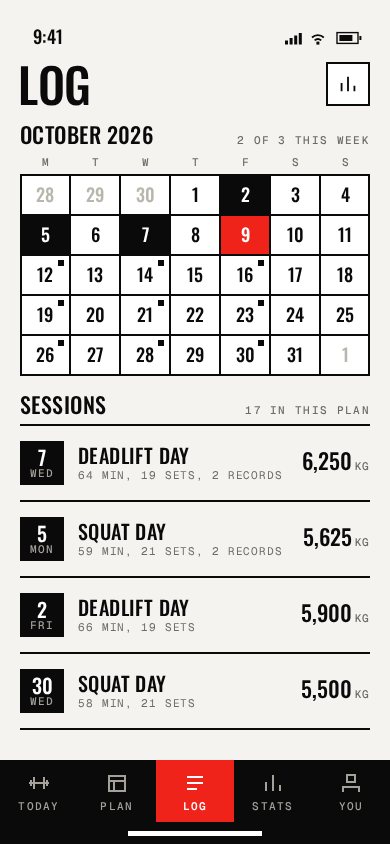
A list screen from Kilo, a strength training log app template in a Brutalist style. Screen 14 of 25.
Kilo is a complete lifting log: welcome, sign in, a short setup, today's workout, a live session with a set table and a rest timer, a plate calculator that draws the loaded bar, an exercise library, lift history, a finished session and a new record. Around it sit history, records, programs, weekly volume and body stats, a weigh in, a Pro plan, notifications, profile and settings. Everything is kilograms, reps and big numbers.
| Detail | Value |
|---|---|
| Screen type | List |
| App | Kilo: Strength training log |
| Category | Health and fitness |
| Design language | Brutalist, light |
| Type | Oswald |
| Colours | #f4f3ef background, #ffffff surface, #0a0a0a text, #6e6c66 text-muted, #f0231b accent, #ffffff accent-contrast, #0a0a0a secondary, #0a0a0a border, #f0231b danger |
What this screen says
- Log
- October 2026
- 2 of 3 this week
- Sessions
- 17 in this plan
- 7Wed
- Deadlift day
- 64 min, 19 sets, 2 records
- 6,250kg
- 5Mon
- Squat day
- 59 min, 21 sets, 2 records
- 5,625kg
- 2Fri
- 66 min, 19 sets
- 5,900kg
- 30Wed
- 58 min, 21 sets
- 5,500kg
- Today
- Plan
- Stats
- You
Around it in Kilo
More list and feed screens
- Tabata History: HIIT interval timer
- Jab History: Boxing workouts with a smart bag
- Exhale History: Breathwork sessions
- Bump Weeks: Pregnancy week by week
- Locker Timetable: Gym membership and class booking
- Morsel Saved meals: AI calorie tracker
- Dew Routine: AI skin scan and routine
- Cradle Day: Baby tracker
- Medly Visits: Doctor on call
- Donor Donations: Blood donation, counted drop by drop
- Unfold Notifications: Yoga and stretching
- Cyra Calendar: Cycle tracker
What makes a good list screen
- Show what people need to decide. Each row should carry just enough to choose: a title, one or two details and a status. Everything else belongs on the detail screen.
- Keep rows consistent. The same information in the same place on every row lets people scan down a column instead of reading each item.
- Group with headings. Dates, categories or status headings break long lists into chunks people can skip through.
- Make common actions quick. Swipe actions, a checkbox or a heart on the row save opening the item for small tasks.
The full list screen guide and every example
Remix Kilo free: describe your own app and it is drawn in this design. Or get its files from $10: Figma, React Native, SwiftUI, Flutter and HTML.