Templates · List and feed screens · Productivity app · Scribe
Scribe Library screen
A list screen from Scribe, a voice memos to notes app template in a Glass style. Screen 10 of 25.
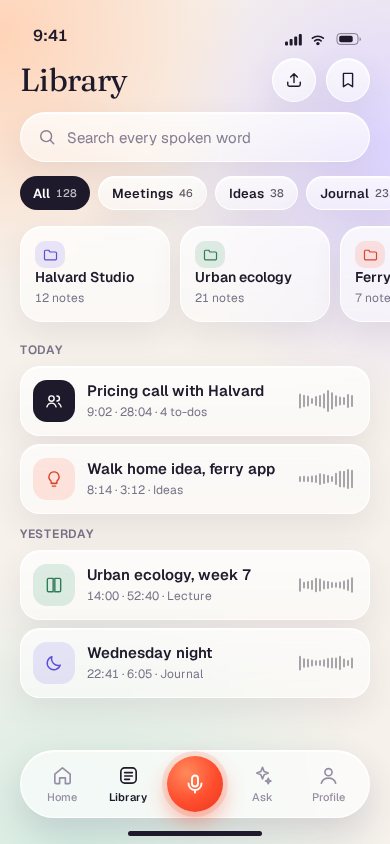
Scribe is a complete voice to notes app: welcome, setup and sign in, a home with the latest note and open to-dos, live recording with a running transcript, a transcribing tracker, a note with summary, key points and a pull quote, a karaoke style transcript player with speaker lanes, action items, library, search inside audio, folders, ask your notes, rewrite formats, sharing with a confirmation, saved highlights, audio import, monthly insights, notifications, a Pro plan with checkout and success, profile and settings. Warm pearl glass with aubergine ink, vermilion and a citron highlighter.
| Detail | Value |
|---|---|
| Screen type | List |
| App | Scribe: Voice memos to notes |
| Category | Productivity |
| Design language | Glass, light |
| Type | Fraunces for headings, Geist for text |
| Colours | #f6f1eb background, #ffffff surface, #1f1a2b text, #7a7287 text-muted, #ff4d2e accent, #ffffff accent-contrast, #8c7cf0 secondary, #e9f56a highlight, #ebe4dc border, #e8361d danger |
What this screen says
- Library
- Search every spoken word
- All 128 Meetings 46 Ideas 38 Journal 23
- Halvard Studio12 notes
- Urban ecology21 notes
- Ferry app7 notes
- Today
- Pricing call with Halvard9:02 · 28:04 · 4 to-dos
- Walk home idea, ferry app8:14 · 3:12 · Ideas
- Yesterday
- Urban ecology, week 714:00 · 52:40 · Lecture
- Wednesday night22:41 · 6:05 · Journal
- Home
- Ask
- Profile
Around it in Scribe
More list and feed screens
- Ping History: Internet speed test
- Glance History: Visual search with the camera
- Replay Library: Record and share screen videos
- Easel Templates: Collaborative whiteboard
- Token Requests: Two-factor codes and sign-in approvals
- Beam Transfers: Send big files
- Parchment Files: Documents, edit and share
- Lectern New deck: Slides and presenter remote
- Ringer Recents: Phone, contacts and voicemail
- Pipeline: Sales CRM on the road
- Aim Objectives: Goals and key results
- Inkline Inbox: Sign and send contracts
Every productivity app list screen
What makes a good list screen
- Show what people need to decide. Each row should carry just enough to choose: a title, one or two details and a status. Everything else belongs on the detail screen.
- Keep rows consistent. The same information in the same place on every row lets people scan down a column instead of reading each item.
- Group with headings. Dates, categories or status headings break long lists into chunks people can skip through.
- Make common actions quick. Swipe actions, a checkbox or a heart on the row save opening the item for small tasks.
The full list screen guide and every example
Remix Scribe free: describe your own app and it is drawn in this design. Or get its files from $10: Figma, React Native, SwiftUI, Flutter and HTML.